Launch and drive a Minecraft dev client from the shell — for coding agents.
Everything is a bash command, so this works identically in a local terminal, in Claude Code on the web, and in CI. There is no MCP server and nothing to configure.
npm install -g cyclops-clientdevbridge-cli    # or use npx

cd path/to/your/mod
clientdevbridge doctor        # is this machine able to build and launch a client?
clientdevbridge start         # boots the dev client, headless if there is no $DISPLAY
clientdevbridge status        # what is it showing right now?
clientdevbridge screenshot    # prints a PNG path — open it with your agent's file-reading tool
clientdevbridge stop
You do not need to modify your mod project. start generates
.clientdevbridge/init.gradle and passes it to ./gradlew runClient, which injects the matching
ClientDevBridge mod build and pins the settings that
make screenshots reproducible.
Not a stub renderer and not a headless simulation: an actual Minecraft client on a virtual display,
with software OpenGL. Every image below was produced by the commands beside it, on a machine with
no GPU and no $DISPLAY.
clientdevbridge world-reset
clientdevbridge setblock  0 4 2 minecraft:crafting_table
clientdevbridge setblock  2 4 2 minecraft:chest
clientdevbridge setblock -2 4 2 minecraft:furnace
clientdevbridge give minecraft:diamond 5
clientdevbridge teleport 0 5 6 --yaw 180 --pitch 20
clientdevbridge screenshot --name scene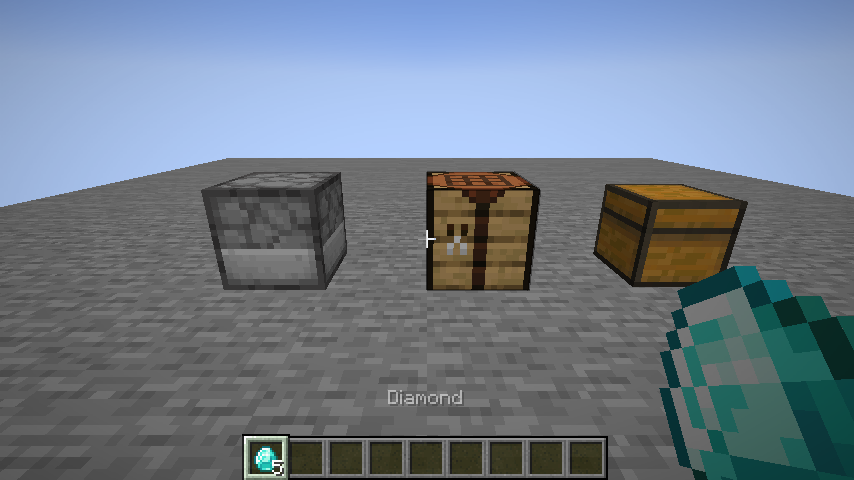
inspect-gui right-clicks a block, waits for the screen, prints the widget tree, and writes a
screenshot — one command for the thing you actually want.
$ clientdevbridge inspect-gui 0 4 2
CraftingScreen  "Crafting"
gui 427x240 @ scale 2, window 854x480px, mouse at 213.5,120
container CraftingMenu at (125,37) 176x166, 46 slots (1 filled)
  slot 14 (empty) @(205,121) hovered
  slot 37 minecraft:diamond x5 @(133,179)
  ImageButton " button Left click to activate" @(130,71 20x18)  /root/children[0]
  RecipeBookComponent @(unknown)  /root/children[1]

/path/to/mod/.clientdevbridge/screenshots/inspect-gui_....png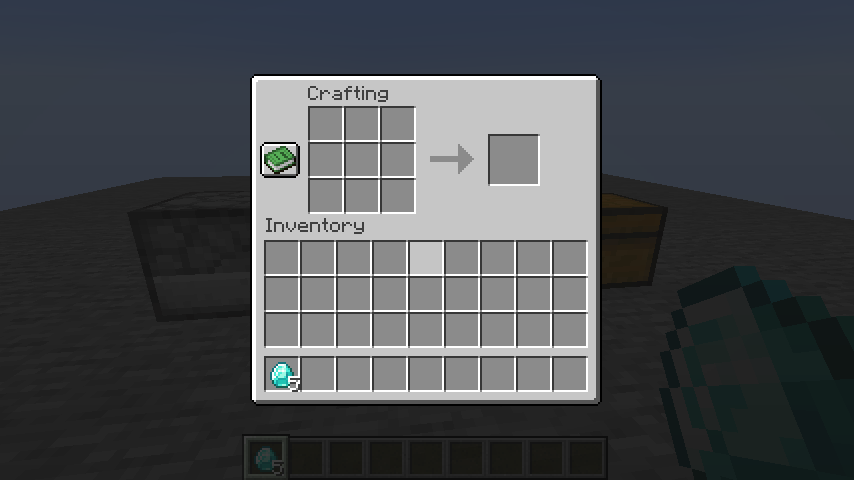
The two halves answer different questions, and a bug is usually a disagreement between them. The outline says what the game thinks is there; the screenshot says what is drawn. Check them against each other: the container is reported at GUI (125,37) 176x166, which is pixels (250,74)–(602,406) at scale 2 — where the panel is. The diamonds are at (133,179), bottom-left of the inventory grid. Slot 14 is marked hovered, and it is the visibly lightened one.
Coordinates are in GUI space and are what you send back:
clientdevbridge find "button"            # locate a widget by label, type or path
clientdevbridge click --widget "/root/children[0]"
clientdevbridge tooltip --at 133,179    # read what hovering there would show
clientdevbridge snapshot --json # the whole tree, for a program to consumecompare checks a screenshot against a committed golden image and writes a diff you can look at.
Golden sets are kept per GL renderer, because llvmpipe and a real GPU do not produce identical
pixels and one tolerance cannot cover both without hiding regressions.
$ clientdevbridge compare scene --update      # record
$ clientdevbridge compare scene               # verify
scene: matches (0 of 409920 pixels differ, 0.000% <= 0.1%).

$ clientdevbridge setblock 2 4 2 minecraft:oak_slab    # break something
$ clientdevbridge compare scene
scene: DIFFERS — 7811 of 409920 pixels, 1.905% > 0.1%.
/path/to/mod/.clientdevbridge/diffs/scene_..._-diff.png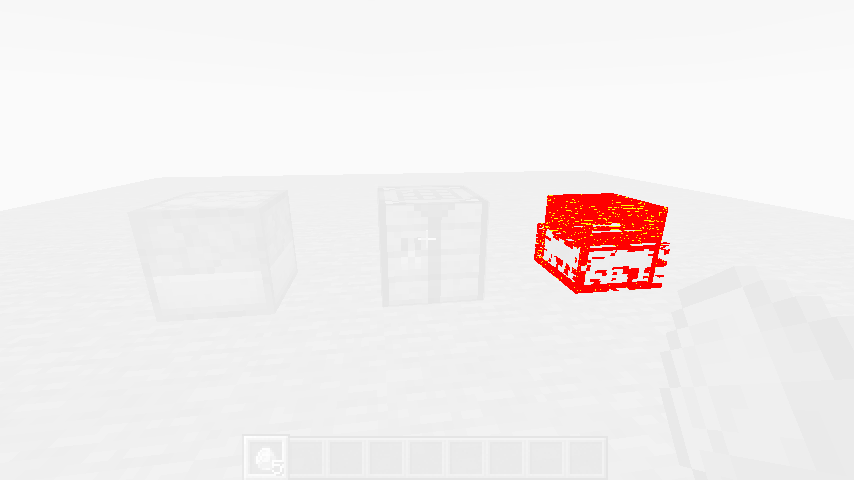
The unchanged scene is ghosted so the change is the only thing you see. --region narrows the
comparison to a rectangle — applied to the golden as well, so it needs no re-record — and
--threshold sets how much drift still counts as a match.
The reverse assertion — this did change something — is screenshot --diff:
$ clientdevbridge screenshot --name lamp-off
/path/to/mod/.clientdevbridge/screenshots/lamp-off.png
$ clientdevbridge command "setblock 0 4 2 minecraft:redstone_block"
$ clientdevbridge screenshot --name lamp-on --diff .clientdevbridge/screenshots/lamp-off.png
/path/to/mod/.clientdevbridge/screenshots/lamp-on.png
changed: 4812 of 409920 pixels, 1.174% >= 0.1%.
It exits non-zero when the two are too similar, so "did that visibly do anything" is a check a script can make rather than something you have to look at.
Determinism is not luck: start pins the GUI scale, disables clouds, particles, entity shadows,
view bobbing and vsync, fixes the window size, and the test world is a fixed-seed superflat with
the daylight cycle and weather off. world-reset puts the player at a known position every time.
clientdevbridge click --at 205,121              # or --widget by text or path
clientdevbridge type "hello"                    # into the focused widget
clientdevbridge key ESCAPE                      # or 'E', or 'GLFW_KEY_F3'
clientdevbridge hold-key W --ticks 20           # movement, held through the real key binding
clientdevbridge drag --from 133,179 --to 205,121
clientdevbridge scroll --at 200,120 --dy -3
Input goes through the game's own handlers, so a mod's click logic runs exactly as it would for a player. Off-screen coordinates are refused rather than silently doing nothing.
clientdevbridge world-reset                     # fixed-seed creative superflat, player at 0,4,0
clientdevbridge world-reset --template my-save  # or start from a world committed in your repo
clientdevbridge command "fill -4 4 -4 4 8 4 minecraft:air"
clientdevbridge block 0 4 2 --json              # block, state, properties, block entity NBT
clientdevbridge inventoryclientdevbridge wait --screen CraftingScreen --timeout 5000
clientdevbridge wait --ticks 20
clientdevbridge wait --chunk 0,4,0
clientdevbridge wait --expr "mc.level != null"Every wait reports the state it actually observed when it times out, so a failure says what was on screen rather than only that something did not happen.
clientdevbridge hotswap        # recompile and redefine changed classes in the running client
clientdevbridge eval "player.getY()"
clientdevbridge logs --lines 20 --level warn
hotswap redefines method bodies through JDWP, so the client has to have been started with a
debug port: clientdevbridge start --jdwp-port 5005. Adding or removing a field, a method or a
superclass cannot be redefined by any JVM — hotswap says so and points at restart, rather than
reporting success and leaving you looking at stale code. --restart-if-needed makes that call for
you and restarts with the options the running client was launched with, so you do not have to know
HotSpot's redefinition rules to keep going.
Booting is a minute or two and it throws away the world you built, so prefer hotswap to
restart: keep one client alive for a whole session.
eval is an escape hatch for what no command covers, with mc, player, level, screen,
server and dev bound. dev builds and reads the game objects a script cannot name for itself —
dev.pos(0, 4, 2), dev.blockEntity(...), dev.nbt(...), dev.item("minecraft:stone"),
dev.prop(0, 4, 2, "lit") — because the game is loaded by a transforming class loader and the
script engine is not. It is opt-in and
localhost-only, like the whole bridge.
clientdevbridge batch build-network.txt # or '-' to read the commands from stdinEvery command opens a socket, does one thing and closes it. That is right for a command you type
and wrong for the fifty a script issues in a row, where connecting costs more than the work.
batch holds one connection open and replays the lines through the same parser the shell uses, so
nothing about any command changes:
setblock 0 4 2 minecraft:redstone_lamp
open-gui 0 4 2 --face north
set-text "Pulse length" 77 --commit enter
close-screen
It stops at the first failure and says which line, because in a script that builds something, step
twelve is meaningless if step eleven did not happen. --continue-on-error runs the rest anyway,
and --json prints one result object per command.
$ clientdevbridge break 0 4 2
broke Block{minecraft:cobblestone} in 9 ticks
  dropped minecraft:cobblestone x1 at 0.26, 4.00, 1.82
$ clientdevbridge walk-to 0.26 1.82
Walked to 0.18, 4.00, 1.24.
Mining is a held action, and how long it takes depends on the block and the tool — so break holds
attack and advances the progress once per tick until the block gives way, which is what makes the
tick count mean something: nine with a diamond pickaxe, about two hundred with bare hands, and bare
hands drop nothing. The drop is thrown, so its position is reported: that is where you walk to.
hold-key ATTACK --ticks 20 is the underlying mechanism. It also takes USE — eating, drinking,
drawing a bow, raising a shield — and MOUSE_LEFT/MOUSE_RIGHT/MOUSE_MIDDLE.
clientdevbridge use-item --wait-screen
clientdevbridge open-gui                # no coordinates means the held item
The plainest interaction in the game, and how most item GUIs open. A right-click aimed at a block
interacts with the block instead — what a player gets, and the likeliest reason an item looks like
it did nothing — so use-item reports what it was aimed at and says so. --hand main skips that
decision; --hand off reaches an off-hand item, which a player cannot aim at.
clientdevbridge slot-click 12 --type quick_move
clientdevbridge click --at 125,202 --shift
A screen works out that a click was a shift-click from the real keyboard state, which synthetic
input cannot reach — and Screen.mouseClicked has nowhere to pass a modifier anyway. So the
operation is named rather than inferred: quick_move is what a shift-click means. --type also
takes pickup, swap, clone, throw, quick_craft and pickup_all.
clientdevbridge set-text "Pulse length" 77 --commit enterThe manual version is click, press BACKSPACE as many times as the old value is long, type, then trigger whatever commits it. The snapshot already knows the field's current value, so the count is exact; the value is read back afterwards and reported, so a field that rejected a character says so rather than surfacing three commands later.
Most blocks behave the same whichever side you click. Multipart blocks — Integrated Dynamics' cables, and anything else built on CyclopsCore — decide what you clicked by casting a ray from the player's eye, so the side is the whole interaction:
$ clientdevbridge use 0 4 2 --face up
used the main hand on the up side of 0,4,2: SUCCESS

$ clientdevbridge open-gui 0 4 2 --face up
screen: org.cyclops.integrateddynamics.client.gui.container.ContainerScreenPartWriter
use is the general right-click, for anything that leaves no screen behind: placing a block or a
part, using a tool, wrenching with --sneak. open-gui is use plus a wait for a screen.
These exist so an agent reading stdout can act on it without guessing:
- Images are never printed.
screenshotwrites a file and prints its absolute path on its own line. Open that path with your file-reading tool. - Default output is readable text.
--jsonprints the raw protocol result instead. - Exit codes:
0success,1a protocol-level failure (bad arguments, a method that refused),2a session or connection failure (nothing running, port taken, client gone).
A session lives in <project>/.clientdevbridge/:
session.json     port, pid, loader, Minecraft version, when it started
gradle.log       the client's stdout and stderr
screenshots/     PNG output
golden/          committed golden images — this one is meant to be checked in
init.gradle      regenerated on every start
start detaches the client into its own process group, so it outlives the CLI invocation that
created it; stop kills the whole group. Every command detects a stale session.json — a
reclaimed cloud VM, a crash, a reboot — and says "not running" cleanly instead of hanging.
On Linux with no $DISPLAY, start wraps the launch in xvfb-run and forces Mesa's llvmpipe
software rasteriser. This is a real client on a virtual display, not a client that skips
rendering, so screenshots show exactly what a player would see. Everywhere else, and with
--headed, a normal window opens. Nothing else about the CLI's behaviour differs.
sudo apt-get install -y xvfb libgl1-mesa-driclientdevbridge doctor checks for all of this and prints the exact command to fix whatever is
missing.
This package is version-agnostic and single-branch. The wire protocol is identical on every
ClientDevBridge branch, so one CLI release drives every supported Minecraft version. The only
version knowledge it holds is which branch publishes builds for which Minecraft version, in
src/artifacts.ts — today the 1.21, 26 LTS and 26 lines. That file is the authority rather than
this paragraph, and clientdevbridge doctor prints which branch it picked for the project in
front of you, so neither has to be trusted from memory.
npm install
npm test           # unit tests and recorded-transcript replay; no Minecraft needed
npm run build
npm run lint
scripts/record-fixture.mjs records a handshake and transcript from a running client into
test/fixtures/transcripts/, which is how a CLI release is verified against every branch without
booting the game.
AGENTS.md is the guide for working on this repository: how it relates to the mod
repository, which side a change belongs on, and what to re-record when the protocol grows.