Invisible git sync for development. An auto-commit, multi-mirror daemon that watches your repos, commits every change with deterministic, facts-based messages, and pushes to GitHub, GitLab, and Codeberg simultaneously.
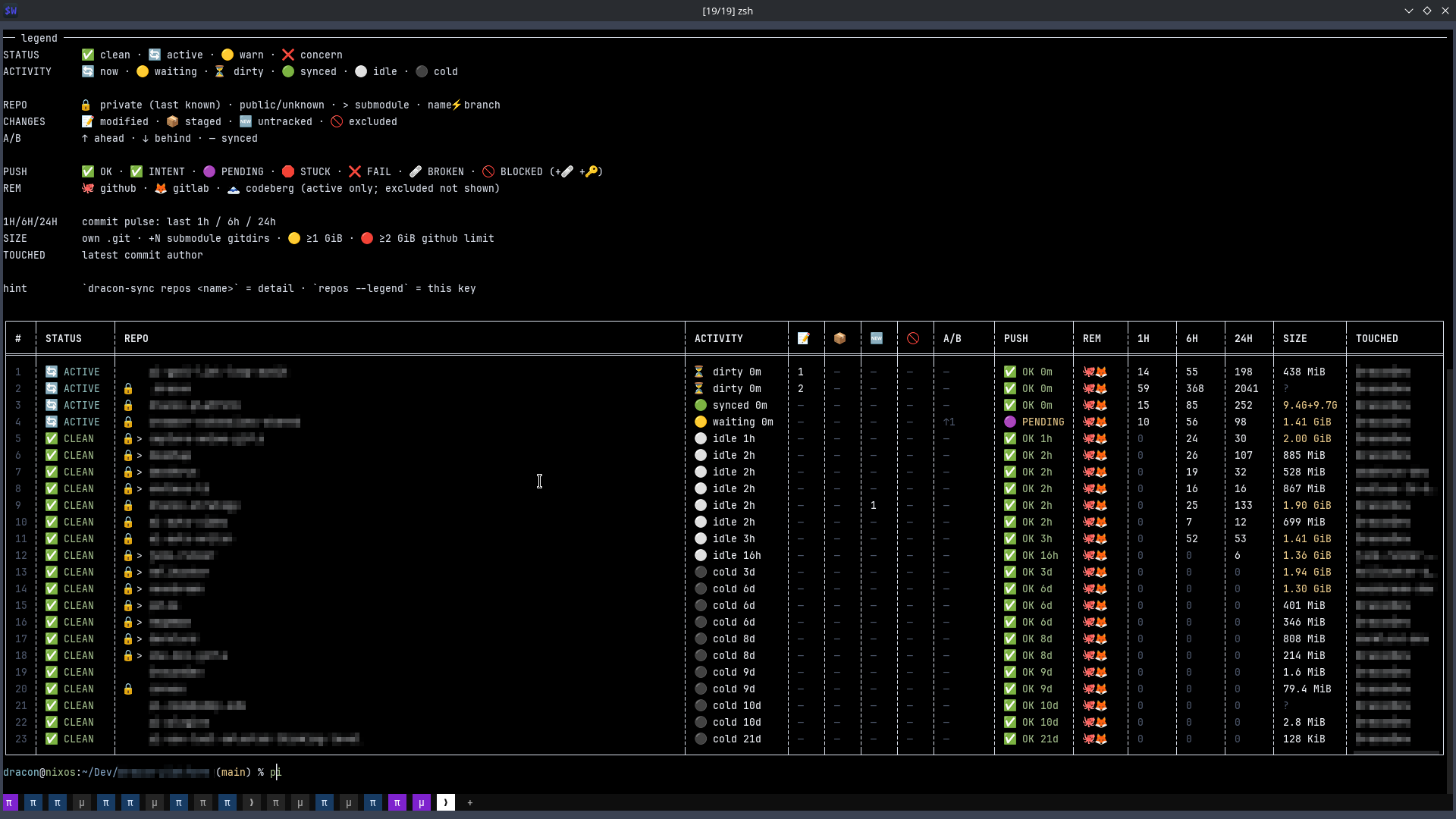
This page is the user guide for dracon-sync (also rendered on
crates.io). This repo is the canonical, live source on main
(mirrored to GitLab and Codeberg). For workspace builds it is also
checked out as a nested standalone repo under dracon-sync/ in the
dracon-utilities
parent repo — a regular nested repo, not a submodule.
cargo install dracon-syncThe binary lands at ~/.cargo/bin/dracon-sync (version 0.113.55 on
crates.io). The shipped systemd unit runs %h/.local/bin/dracon-sync, so
for service use either copy it there or install from a checkout:
# Clone the repo
git clone https://github.com/DraconDev/dracon-sync-background-auto-commit-multi-remote.git
cd dracon-sync-background-auto-commit-multi-remote

# Build (locked)
cargo build --release --locked

# Install where the service unit looks
install -d "$HOME/.local/bin"
install -m 0755 target/release/dracon-sync "$HOME/.local/bin/dracon-sync"
Or, from a full dracon-utilities checkout, run ./install.sh at the
parent root to install all three utilities plus services and hooks in
one pass.
Other tools solve parts of the problem:
- git-auto-sync: Auto-commits a single repo, no mirroring
- gitea-mirror: One-way mirror to a single Forgejo instance, no auto-commit
- git-bridge: Multi-provider sync, but no auto-commit or AI
- swarf: Invisible sync for AI agents, but only a side-band directory
dracon-sync is the only tool that combines all of these into one daemon:
| Capability | git-auto-sync | gitea-mirror | git-bridge | swarf | dracon-sync |
|---|---|---|---|---|---|
| Auto-commit on change | ✅ | ❌ | ❌ | ✅ | ✅ |
| Multi-repo watch | ❌ | ✅ | ✅ | ❌ | ✅ |
| Multi-provider mirror | ❌ | ✅ (→1) | ✅ | ❌ | ✅ (3+) |
| Deterministic commit messages | ❌ | ❌ | ❌ | ❌ | ✅ |
| Version bump + release | ❌ | ❌ | ❌ | ❌ | ✅ |
| Safety guards | ❌ | ❌ | ❌ | ❌ | ✅ |
| Visibility sync | ❌ | ❌ | ❌ | ❌ | ✅ |
| Broken tracking repair | ❌ | ❌ | ❌ | ❌ | ✅ |
The AI (or human) works on one repo at a time, makes changes, and sync handles the rest — the AI never needs to think about commits, pushes, or cross-repo coordination.
- You edit files
- Sync detects changes within seconds
- After a brief inactivity delay (5s default), sync commits with a deterministic message
- Pushes to origin (GitHub) and all mirror remotes (GitLab, Codeberg)
- Done — no manual git commands needed
GitHub origin uses HTTPS with Personal Access Tokens — more reliable than SSH (no agent timeouts, no key rotation). GitLab and Codeberg mirrors use SSH by default, with HTTPS PAT fallback on SSH failures.
When auto_github_private = true, newly initialized repos without an origin remote automatically get a private GitHub repository created via gh, with the remote added and initial commit pushed.
- Monitors repositories for changes across watched roots
- Commits, pulls, and pushes automatically based on policy
- Respects freeze markers (e.g., during deployments)
- Detects and repairs common git issues (conflicted remotes, stuck pushes)
- Repairs broken upstream tracking refs (e.g.
origin/master: gone) - Consolidates dual main/master branch repos to main
- Manages permanently stuck repos
- Prunes stale operational state on daemon restart (stuck repos, incident ledger, visibility cache)
Deterministic facts extracted from the diff. No AI, no LLM, no prose. Routing
keys are grep-searchable via git log --grep=.
Run the repository installer from the repository root:
cd dracon-utilities
./install.sh
This will:
- Build the release binary
- Install to
~/.local/bin/dracon-sync - Set up and start the systemd user service
The per-utility directories do not contain standalone installers; use the root install.sh for all utilities.
# Build
cargo build --release --locked -p dracon-sync

# Copy binary
cp target/release/dracon-sync ~/.local/bin/

# Install systemd service
mkdir -p ~/.config/systemd/user
cp dracon-sync.service ~/.config/systemd/user/
systemctl --user daemon-reload
systemctl --user enable dracon-sync.service
systemctl --user start dracon-sync.service# Show policy path, watched roots, and discovered repos
dracon-sync status
# One-shot sync across all discovered repos
dracon-sync once
# Run continuous sync daemon (default: 1s pulse interval)
dracon-sync daemon
# Override the pulse interval from CLI
dracon-sync daemon --interval-secs 30
# Sync a specific repository now
dracon-sync sync-now ~/Dev/my-project
# Sync repos currently reported as WARN (dirty-only triage)
dracon-sync sync-now --warns
dracon-sync sync-now --warns --dry-run
# Edit the sync policy
dracon-sync config edit
# Validate the sync policy
dracon-sync config validate
# Report across all repos
dracon-sync repos
dracon-sync repos --only-concern
dracon-sync repos --json
# Repair concern repos (dry-run by default)
dracon-sync repair concerns
dracon-sync repair concerns --apply
# Repair warn repos
dracon-sync repair warns
dracon-sync repair warns --apply
# Manage stuck repos
dracon-sync repair stuck-list
dracon-sync repair stuck-unstuck ~/Dev/repo
# Manage dual-branch repos
dracon-sync repair dual-branch-list
dracon-sync repair dual-branch-repair ~/Dev/repo
# Repair orphan origin URLs (e.g. after remote rename)
dracon-sync repair origins
dracon-sync repair origins --apply
# Scaffold standard files (LICENSE, optional .github/FUNDING.yml, ...)
# FUNDING.yml is Dracon-specific; external users must opt in explicitly.
dracon-sync scaffold
dracon-sync scaffold --repo ~/Dev/repo --files LICENSE
dracon-sync scaffold --repo ~/Dev/repo --files '.github/FUNDING.yml' --dry-run
# Manually publish to registries
dracon-sync publish run ~/Dev/repo
dracon-sync publish status ~/Dev/repo
# Check daemon health and metrics
dracon-sync health
dracon-sync metrics
# Print version
dracon-sync --version# Check status
systemctl --user status dracon-sync.service
# View logs
journalctl --user -u dracon-sync -f
# Restart after config changes
systemctl --user restart dracon-sync.serviceNever systemctl stop the daemon for git surgery — use
dracon-sync maintenance -- <cmd> instead (it pauses, runs the command,
and always resumes).
The live config lives at ~/.dracon/utilities/sync/dracon-sync.toml
(dracon-sync config edit / dracon-sync config validate). The annotated
template is dracon-sync.example.toml in this repo
(dracon-sync/dracon-sync.example.toml from the monorepo root):
[sync]
# Watch directories for git repositories
watch_roots = ["/home/user/Dev", "/home/user/work"]

# Pulse interval in seconds (how often to scan for changes)
pulse_interval_secs = 1

# Delay after last change before auto-push (seconds)
inactivity_push_delay_secs = 5

# Auto git operations
auto_commit = true
auto_pull = true
auto_push = true
auto_bump_versions = true

# Auto-repair concerns and warnings
auto_repair_concerns = true
auto_repair_warns = true

# Automatic private GitHub remote creation
# When a repo has no origin remote, creates a private GitHub repo,
# adds the HTTPS remote, and pushes the initial commit.
auto_github_private = true
auto_github_private_account = "YourOrgOrUsername"

# Exclude specific repos or directories
exclude_repos = ["/home/user/Dev/archived"]
exclude_dir_names = ["node_modules", "target", ".venv"]If auto_github_private = true in your policy, any git init in a watched root will automatically:
- Create a private GitHub repo via
gh repo create --private - Add the HTTPS remote:
git remote add origin https://github.com/account/repo.git - Push the initial commit:
git push -u origin HEAD
Requirements:
ghCLI must be installed and authenticated (gh auth login)auto_github_private_accountmust match your GitHub username or org
Push to multiple providers simultaneously. GitHub uses HTTPS + PAT; others use SSH with HTTPS fallback:
[[remotes]]
name = "github"
push_url = "https://github.com/DraconDev/{repo}.git"

[[remotes]]
name = "gitlab"
push_url = "git@gitlab.com:dracondev/{repo}.git"
auto_create = true

[[remotes]]
name = "codeberg"
push_url = "git@codeberg.org:dracondev/{repo}.git"
auto_create = false  # Codeberg/Forgejo doesn't support push-to-create
Store PATs for HTTPS fallback and API operations:
# GitLab
echo "GITLAB_TOKEN=<token>" > ~/.dracon/utilities/sync/secrets/gitlab.env

# Codeberg
echo "CODEBERG_TOKEN=<token>" > ~/.dracon/utilities/sync/secrets/codeberg.env
Commit messages are deterministic facts extracted from the diff — no AI, no inference.
[INTENT] | N file(s) in DIRS [files] DELTA:+A/-B [METRICS]
- INTENT — task state transitions from markdown (
CLOSED: task1, task2orWIP: task1), capped at 10 tasks - DIRS — top-level directories touched (root files show no
inclause) - DELTA — lines added/removed
- METRICS —
TEST:,NEW:,DEL:,DEPS:,BIN:,TESTONLY:,ENV:,TAG:,MERGE:,REVERT:
LLM-scribed commit messages were removed — they hallucinated context and the AI reads the diff anyway. Mechanical facts are searchable (git log --grep="JWT"), honest, and compact.
On daemon start/restart, sync prunes stale operational state:
- Stuck repos: Removes entries from stuck-push tracking for repos no longer stuck
- Incident ledger: Enforces retention policy (keeps last N entries per
incident_retention) - Alert ledger: Keeps a JSONL history of desktop-sync alert attempts under
~/.local/state/dracon/dracon-sync-alerts.jsonl - Visibility cache: Removes orphan
.lastfiles for repos no longer watched - Broken tracking: Repairs
origin/master: gonerefs → re-points toorigin/{branch} - Stale index.lock: Removes
.git/index.lockfiles with no holding process (left by crashed git operations). Without this, a stale lock blocks all git operations in that repo.
Broken tracking repair also runs every ~300 cycles (~5 min) in the daemon loop, since new :gone tracking breaks can appear at runtime.
Push timeouts: code defaults are push_op_timeout_secs = 300,
pull_op_timeout_secs = 30, repo_sync_timeout_secs = 420,
push_retries = 3 (all progress-aware: active transfers extend the idle
deadline). The fleet operator config overrides the push timeout to 900s.
A hanging mirror push blocks the daemon for that repo until it times out,
so tune these down on flaky networks rather than up.
Filter-only cooldown: Repos with clean/smudge filter changes (e.g. dracon-warden encryption) show as dirty in git status but have no diff after staging. The daemon detects this, resets the staging area, and applies a cooldown to prevent tight re-check loops.
Fingerprint-based scheduling: The daemon uses a fingerprint (branch + effective_dirty + staged + ahead + behind) to determine if a repo needs syncing. Only after the fingerprint stays stable for inactivity_push_delay_secs (default 5s) does the daemon attempt a sync.
When a push fails, dracon-sync follows this decision tree to recover:
Push Attempt
├── SSH push with hardening (ConnectTimeout=10, ConnectionAttempts=2)
│   ├── Success → Done ✅
│   └── Failure → Continue
├── Retry loop (configurable retries, linear backoff 1-5s)
│   ├── Success → Done ✅
│   └── Failure → Continue
├── Transport fallback (SSH → HTTPS)
│   ├── GitHub HTTPS (no token needed for public repos)
│   ├── GitLab HTTPS (requires GITLAB_TOKEN)
│   ├── Codeberg HTTPS (requires CODEBERG_TOKEN)
│   ├── Success → Done ✅
│   └── All fail → Continue
└── Final failure handling
    ├── Diverged (ahead > 0 AND behind > 0) → Mark as stuck, skip
    ├── Clean + ahead > 0 + 3 failures → Mark as stuck, skip
    └── Other → Log incident, continue to next repo
| Failure Type | Cause | Recovery |
|---|---|---|
| SSH timeout | Network issue, SSH agent not running | HTTPS fallback, retry |
| SSH auth failed | Expired key, permission denied | HTTPS fallback with PAT |
| HTTPS auth failed | Expired/missing PAT | Check token in secrets/ |
| Non-fast-forward | Remote has diverged | Merge/pull or manual resolution; stuck tracking prevents repeated failed pushes |
| Rejected | Branch protection, permission denied | Manual intervention needed |
| Network unreachable | DNS failure, firewall | Retry with backoff |
| Timeout | Hanging connection, large repo | Progress-aware push/pull timeout; failed operations retry or surface in repos/health |
A repo is marked as "stuck" when:
- Diverged:
ahead > 0 AND behind > 0— requires manual resolution - Clean + ahead + failures: Repo has no uncommitted changes, has unpushed commits, and push has failed 3+ times — indicates a permanent issue (deleted remote, permission denied, etc.)
Stuck repos are tracked in ~/.local/state/dracon/dracon-sync-stuck-push-repos.json and skipped until manually unstuck:
dracon-sync repair stuck-unstuck /path/to/repoThe repos command shows real dirty file counts from libgit2's get_status(), not filtered counts. The OK/WARN/CONCERN status uses has_sync_relevant_dirty_entries() (which excludes target/, node_modules/, oversized files, etc.), but the MOD/STG columns always show the actual number of modified/staged files. Previously, when effective_dirty was false (all changes excluded by policy), the report showed 0 — making repos with dozens of uncommitted files appear clean.
src/— utility source codetests/— integration testsCargo.toml— standalone build manifest with registry dependenciesREADME.md— this utility's user guidedracon-sync.example.toml— example configai.example.toml,providers.example.json— AI/credential config templatesdracon-sync.service— systemd user-service unitscripts/— release + install-verification toolingLICENSE,SECURITY.md,.gitignore,.github/— repo metadata- Architecture + invariants:
docs/SOURCE_OF_TRUTH.md - Design notes:
BLUEPRINT.md
| Boundary | Decision |
|---|---|
| Source code | This repo (main branch) |
| Source of truth | This repo; mirrored to GitLab and Codeberg; nested checkout under dracon-sync/ in the dracon-utilities parent |
| Workspace integration | Builds standalone, or as a dracon-utilities workspace member when nested under dracon-sync/ |
| Shared libraries | Published dracon-git crate from crates.io |
| Operational policy | ~/.dracon/utilities/ TOML files |
The descriptive name is a deliberate choice for Codeberg/Forgejo, where
descriptive repo names get upvotes and free attention because readers
immediately know what the project does. The full word list (no fillers, no
audience/UX claims) is documented in
docs/design/github-feature-repos.md.
Watches configured repositories, waits for changes to settle (fingerprint stability / debounce), commits deterministic diff-based messages, and pushes to origin plus configured mirrors. Invisible: runs in the background, no user interaction required.
- Binary:
dracon-sync - Service: dracon-sync.service (
systemctl --user enable --now dracon-sync.service; neversystemctl stopit — usedracon-sync maintenance -- <cmd>for git surgery) - Example policy:
dracon-sync.example.tomlin this repo (dracon-sync/dracon-sync.example.tomlfrom thedracon-utilitiesmonorepo root); the live config lives at~/.dracon/utilities/sync/dracon-sync.toml(dracon-sync config edit/dracon-sync config validate) - Common commands:
dracon-sync status · dracon-sync repos · dracon-sync health · dracon-sync daemon; alsosync-now,pause/resume/maintenance,once,config,repair,ownership,scan-bloat— full list atdracon-sync --help
Changes are made here, on main. The GitLab/Codeberg mirrors follow
automatically, as does the nested checkout in the dracon-utilities parent.
AGPL-3.0-only — see LICENSE.
Part of the Dracon developer workspace.