Skip to content

Don't offer a zero-amount partial approve/pay option when the non-held amount isn't meaningful - #100641

Draft
MelvinBot wants to merge 2 commits into
mainfrom
claude-fixApproveOnlyZeroAmountInSearch
Draft

Don't offer a zero-amount partial approve/pay option when the non-held amount isn't meaningful#100641
MelvinBot wants to merge 2 commits into
mainfrom
claude-fixApproveOnlyZeroAmountInSearch

Conversation

@MelvinBot

Copy link
Copy Markdown
Contributor

Explanation of Change

The approve confirmation on Spend > Reports offered an "Approve only $0.00" option that the report/workspace-chat approve dropdown correctly omits.

getNonHeldAndFullAmount returns hasValidNonHeldAmount, which is false when the unheld total isn't meaningfully different from the full total (for example, a held 0.00 expense alongside an unheld negative expense). Every caller of HoldMenuModalWrapper and ProcessMoneyReportHoldMenu already honours that flag and passes nonHeldAmount: undefined to mean "there is no valid partial amount".

Both modals then threw that intent away:

  1. A nonHeldAmount = '0' default parameter converted the caller's undefined back into a renderable 0.
  2. The partial option was gated on hasNonHeldExpenses — a different boolean that only says whether an unheld expense exists at all — instead of on whether a valid partial amount was actually supplied.

So a report with an unheld expense but no meaningful partial amount rendered "Approve only $0.00" / "Pay only $0.00".

This change drops the '0' default and gates the option on nonHeldAmount !== undefined, so the callers' existing undefined sentinel is respected. The prompt text stays gated on hasNonHeldExpenses, which matches how the approve dropdown gates its own header text on hasOnlyHeldExpenses — only the partial option was wrong.

ProcessMoneyReportHoldMenu is a near-duplicate of HoldMenuModalWrapper and had the identical defect on the Pay flow, reachable from the report preview and the selection toolbar. Both are fixed here so the two surfaces don't drift again.

Regression introduced by: #83667, which rewrote the report/chat approve flow into a dropdown that gates correctly, but left the Search surface on the older modal. Before that PR both surfaces shared this modal, so they could not disagree.

Root cause analysis: #100639 (comment)

Automated checks run locally
Check Result
npm run typecheck ✅ passed
npx eslint on all three changed files ✅ passed
npm run spell-changed ✅ passed (3 files, 0 issues)
npm run react-compiler-compliance-check check on both components ✅ passed
npm test — new HoldMenuModalWrapperTest, ReportPreviewHoldMenuTest, DecisionModalTest, MoneyRequestReportPreview.test ✅ 50 passed

The new test was confirmed to fail against the unfixed code (firstOptionText was " 0") before the fix was restored.

npm run react-compiler-compliance-check check-changed and npm run lint-changed could not resolve their base ref in this environment (GITHUB_BASE_REF is set to an empty string), so the equivalent per-file commands were run instead. npx prettier --check could not run either — it resolved a .prettierrc.js outside the App checkout that requires a plugin not installed there.

Fixed Issues

$ #100639
PROPOSAL: #100639 (comment)

Tests

// TODO: The human co-author must fill out the tests you ran before marking this PR as "ready for review".
// Please describe what tests you performed that validate your change worked.

  • Verify that no errors appear in the JS console

Offline tests

QA Steps

// TODO: The human co-author must fill out the QA tests before marking this PR as "ready for review".
// Please describe what QA needs to do to validate your changes and what areas they need to test for regressions.

  • Verify that no errors appear in the JS console

PR Author Checklist

  • I linked the correct issue in the ### Fixed Issues section above
  • I wrote clear testing steps that cover the changes made in this PR
    • I added steps for local testing in the Tests section
    • I added steps for the expected offline behavior in the Offline steps section
    • I added steps for Staging and/or Production testing in the QA steps section
    • I added steps to cover failure scenarios (i.e. verify an input displays the correct error message if the entered data is not correct)
    • I turned off my network connection and tested it while offline to ensure it matches the expected behavior (i.e. verify the default avatar icon is displayed if app is offline)
    • I tested this PR with a High Traffic account against the staging or production API to ensure there are no regressions (e.g. long loading states that impact usability).
  • I included screenshots or videos for tests on all platforms
  • I ran the tests on all platforms & verified they passed on:
    • Android: Native
    • Android: mWeb Chrome
    • iOS: Native
    • iOS: mWeb Safari
    • MacOS: Chrome / Safari
  • I verified there are no console errors (if there's a console error not related to the PR, report it or open an issue for it to be fixed)
  • I followed proper code patterns (see Reviewing the code)
    • I verified that comments were added to code that is not self explanatory
    • I verified that any new or modified comments were clear, correct English, and explained "why" the code was doing something instead of only explaining "what" the code was doing.
    • I verified any copy / text that was added to the app is grammatically correct in English. It adheres to proper capitalization guidelines (note: only the first word of header/labels should be capitalized), and is either coming verbatim from figma or has been approved by marketing (in order to get marketing approval, ask the Bug Zero team member to add the Waiting for copy label to the issue)
  • If a new code pattern is added I verified it was agreed to be used by multiple Expensify engineers
  • I followed the guidelines as stated in the Review Guidelines
  • I tested other components that can be impacted by my changes (i.e. if the PR modifies a shared library or component like Avatar, I verified the components using Avatar are working as expected)
  • If a new CSS style is added I verified that:
    • A similar style doesn't already exist
    • The style can't be created with an existing StyleUtils function (i.e. StyleUtils.getBackgroundAndBorderStyle(theme.componentBG))
  • If new assets were added or existing ones were modified, I verified that:
    • The assets are optimized and compressed (for SVG files, run npm run compress-svg)
    • The assets load correctly across all supported platforms.
  • If the PR modifies code that runs when editing or sending messages, I tested and verified there is no unexpected behavior for all supported markdown - URLs, single line code, code blocks, quotes, headings, bold, strikethrough, and italic.
  • If the PR modifies a generic component, I tested and verified that those changes do not break usages of that component in the rest of the App (i.e. if a shared library or component like Avatar is modified, I verified that Avatar is working as expected in all cases)
  • If the PR modifies a component related to any of the existing Storybook stories, I tested and verified all stories for that component are still working as expected.
  • If the PR modifies a component or page that can be accessed by a direct deeplink, I verified that the code functions as expected when the deeplink is used - from a logged in and logged out account.
  • If the PR modifies the UI (e.g. new buttons, new UI components, changing the padding/spacing/sizing, moving components, etc) or modifies the form input styles:
    • I verified that all the inputs inside a form are aligned with each other.
    • I added Design label and/or tagged @Expensify/design so the design team can review the changes.
  • I added unit tests for any new feature or bug fix in this PR to help automatically prevent regressions in this user flow.
  • If the main branch was merged into this PR after a review, I tested again and verified the outcome was still expected according to the Test steps.

Screenshots/Videos

Android: Native
Android: mWeb Chrome
iOS: Native
iOS: mWeb Safari
MacOS: Chrome / Safari

MelvinBot and others added 2 commits September 8, 2026 20:23
… hasNonHeldExpenses

Co-authored-by: Marco Chávez <marcochavezf@users.noreply.github.com>
@melvin-bot melvin-bot Bot added Melvin-Test-Android Melvin-Test-Web Triggers Melvin to run the testing steps of the PR on web labels Sep 8, 2026
@MelvinBot
MelvinBot requested a review from a team September 8, 2026 20:32
@codecov

codecov Bot commented Sep 8, 2026

Copy link
Copy Markdown

Codecov Report

✅ Changes either increased or maintained existing code coverage, great job!

Files with missing lines Coverage Δ
...c/components/Modal/Global/HoldMenuModalWrapper.tsx 88.00% <100.00%> (+88.00%) ⬆️
src/components/ProcessMoneyReportHoldMenu.tsx 0.00% <0.00%> (ø)
... and 10 files with indirect coverage changes

@MelvinBot

MelvinBot commented Sep 8, 2026

Copy link
Copy Markdown
Contributor Author

🤖 Android test steps verification results: ✅ pass

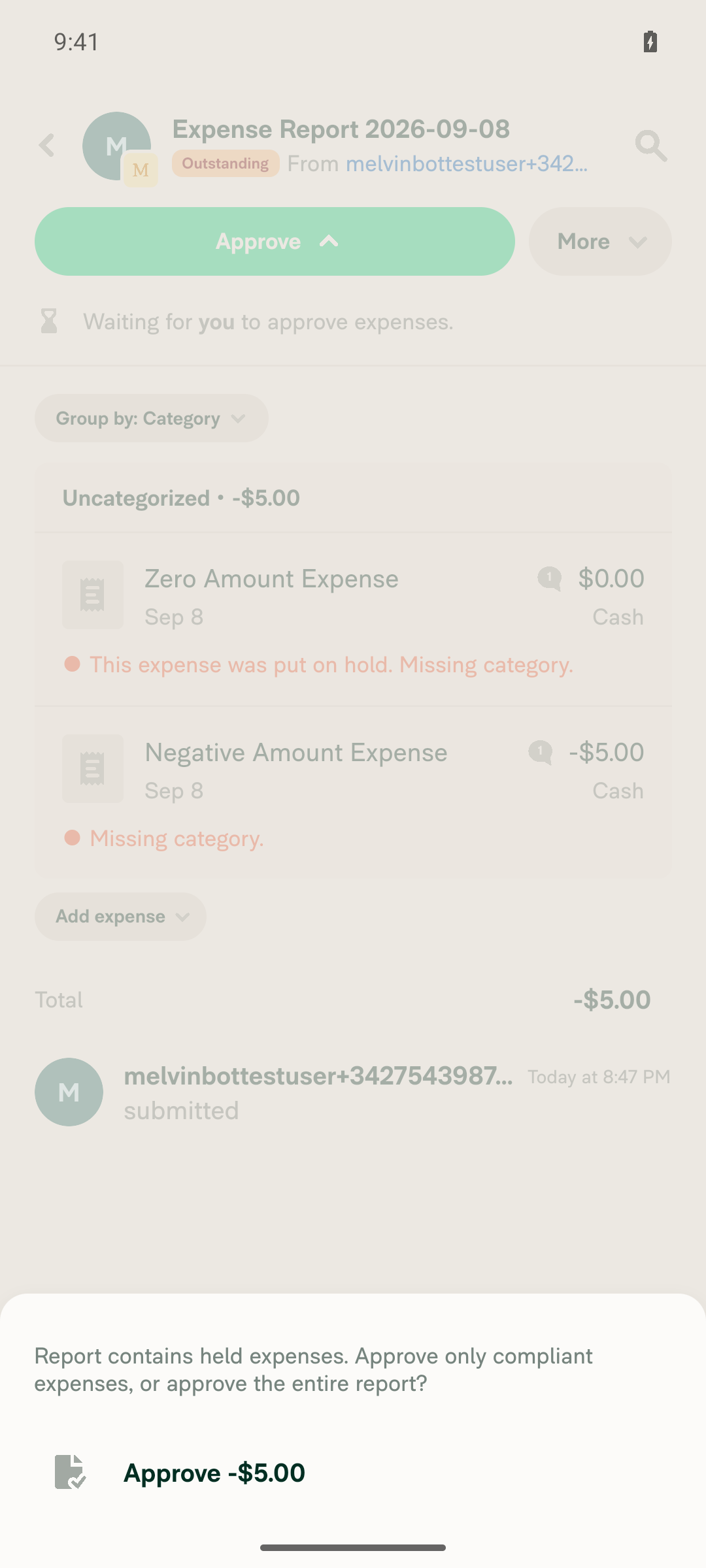
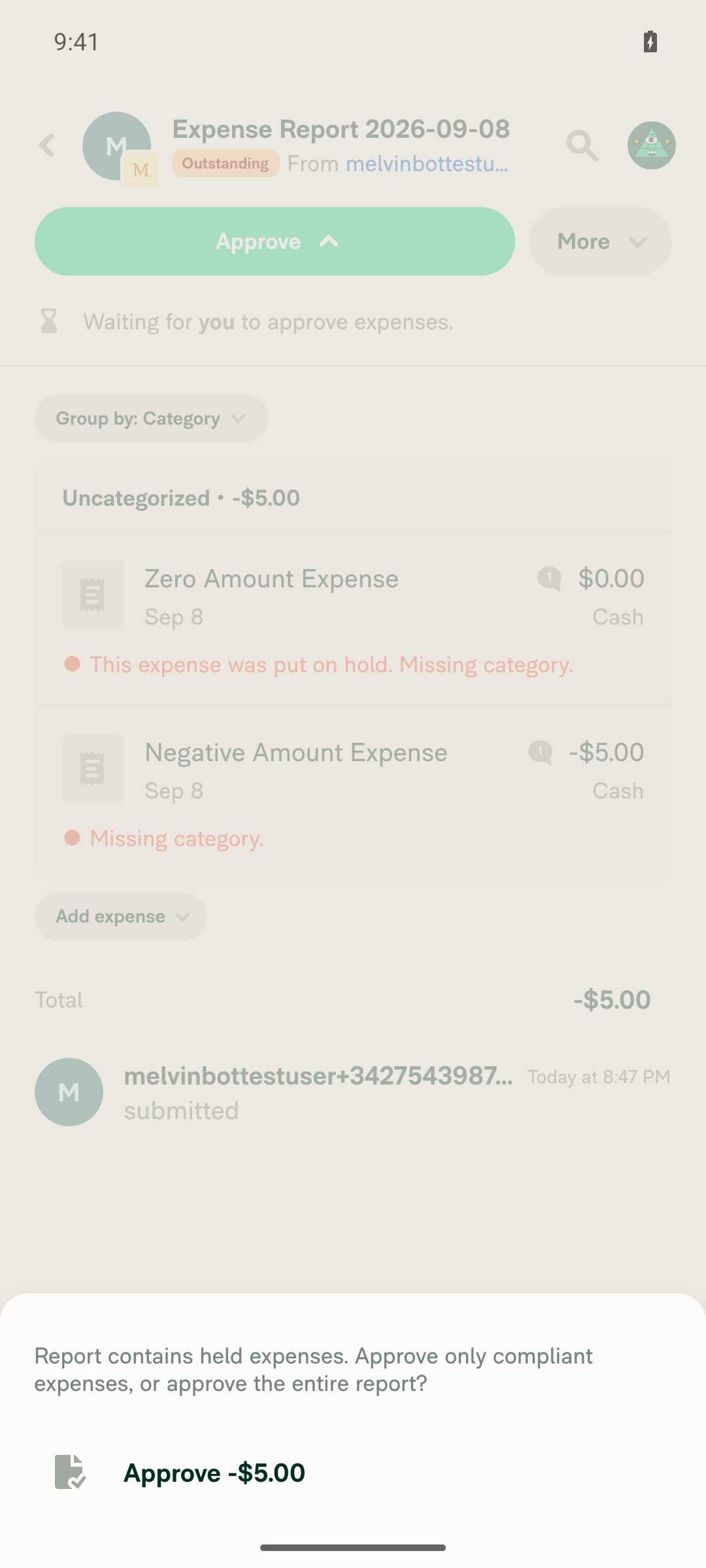
Verified on standalone Android NewDot: the approve confirmation modal never offers a $0.00 partial-approve option for a report with a held $0.00 expense and a non-held -$5.00 expense; it only shows "Approve -$5.00", consistent from both the workspace chat/report and the Spend > Reports entry points.

Approve confirmation reached via Spend > Reports showing only 'Approve -$5.00'

Step Status
VERIFY 1: In workspace chat, tap Approve — the approve confirmation does NOT show a $0.00 partial option.Opened Expense Report 2026-09-08 (Outstanding, total -$5.00, one $0.00 expense on hold) from the workspace chat and tapped Approve. Accessibility snapshot of the confirmation dialog contained exactly one action button, "Approve -$5.00", plus Dismiss — no $0.00/partial option present.
Approve confirmation from workspace chat/report showing only 'Approve -$5.00'
VERIFY 2: Spend > Reports, tap into the report row and tap Approve — the approve confirmation does NOT mention $0.00, matching the chat/report behavior.Navigated Spend > Reports > opened the same "Expense Report 2026-09-08" row and tapped Approve. Confirmation dialog again showed exactly one option, "Approve -$5.00", identical to the workspace-chat path — no $0.00 partial option or mention of the held expense's amount.
Approve confirmation reached via Spend > Reports showing only 'Approve -$5.00'
VERIFY 3: No JS console / app errors appear during the flow.No ReactNativeJS [error] level console output or fatal crashes were logged during expense creation, submit, hold, or approve-modal interactions. A recurring native Unhandled SoftException: java.lang.IllegalStateException: Fabric View [-1] does not have SurfaceId associated with it warning was logged by react-native-keyboard-controller each time a Modal/Popover opened, accompanied by intermittent touch-input freezes on the emulator that required a screen-rotation toggle to recover. It surfaced no user-visible error and looks like environment-level flakiness independent of this PR's approve-modal logic.

Note: the PR's Tests / QA Steps sections are still TODO placeholders, so the steps above were taken from the reproduction steps in #100639.


view run · view recording

@MelvinBot

MelvinBot commented Sep 8, 2026

Copy link
Copy Markdown
Contributor Author

🤖 Web test steps verification results: ✅ pass

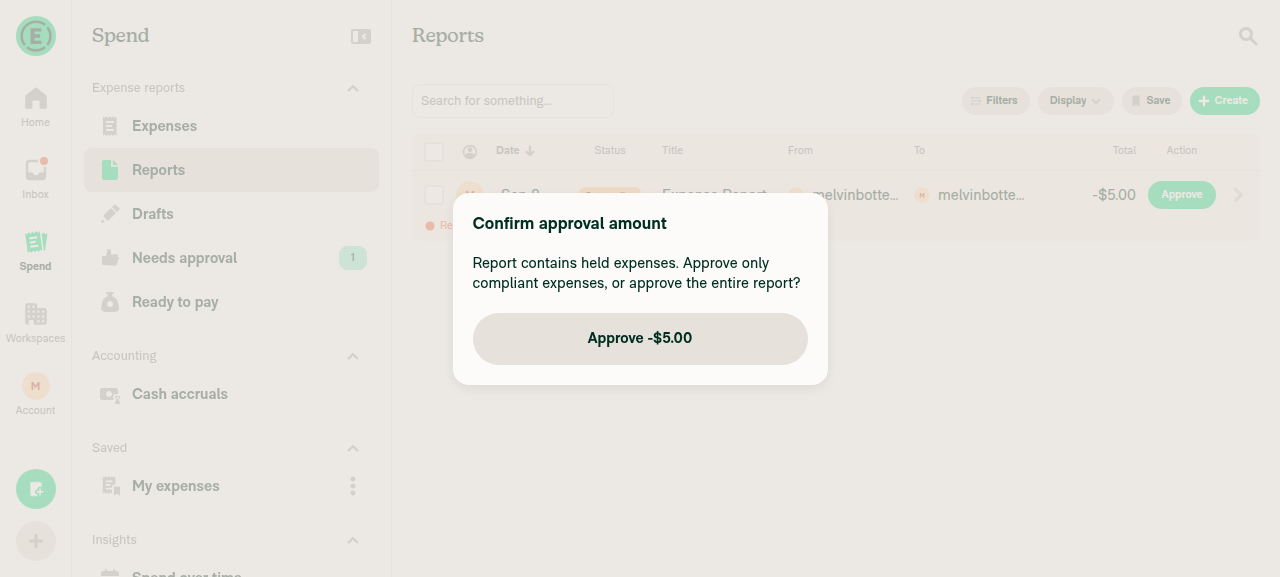
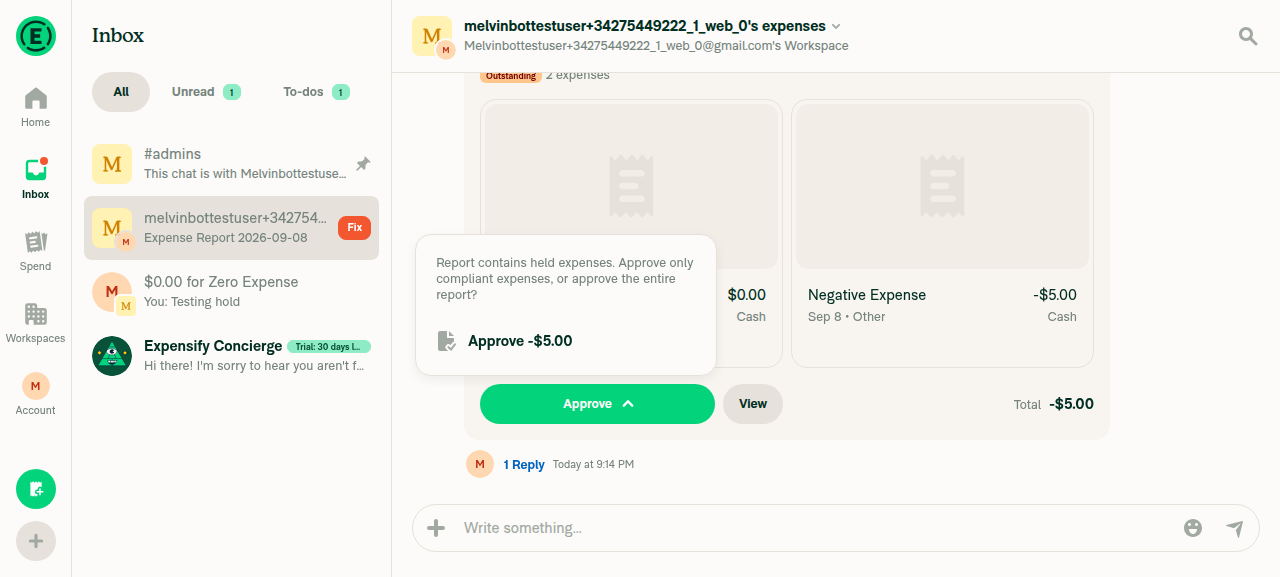
PR #100641's fix verified on dev NewDot web: with a $0.00 expense held and a -$5.00 expense remaining, the approve confirmation modal correctly offers only "Approve -$5.00" and never shows a zero-amount "$0.00" partial-approve option, in both the workspace chat and Spend > Reports.

Spend > Reports Confirm approval amount modal showing only 'Approve -$5.00'

Step Status
VERIFY 1: In workspace chat, click Approve — the approve modal does NOT show a $0.00 amount option.Clicking Approve on the report card inside the workspace expense chat opened a confirmation popover reading "Report contains held expenses. Approve only compliant expenses, or approve the entire report?" with a single option "Approve -$5.00". No $0.00 option was present.
Workspace chat Approve dropdown showing only 'Approve -$5.00', no $0.00 option
VERIFY 2: Go to Spend > Reports and click Approve on the report row — the approve modal does NOT mention $0.00 (matches the report/chat behavior).In Spend > Reports, the report row shows Total -$5.00 with an inline Approve button. Clicking it opened a "Confirm approval amount" modal reading the same held-expenses copy with a single button "Approve -$5.00". No mention of $0.00, matching the chat/report behavior.
Spend > Reports Confirm approval amount modal showing only 'Approve -$5.00'
VERIFY 3: No JS console errors appear during the flow.Raw console output could not be captured on the web platform (the tooling's logs command is unsupported there). No error toasts, broken UI, or crash states were observed at any point in the flow — workspace creation, expense creation, submit, hold, and both approve-modal checks — and the UI transitioned cleanly throughout.

Setup notes: the fresh session had no workspace, so one was created to reach a workspace expense chat. Two expenses were created there — a $0.00 "Zero Expense" and a -$5.00 "Negative Expense" — the report was submitted, and the $0.00 expense was put on hold, leaving a non-held total of -$5.00.

The PR's Tests / QA Steps sections are still TODO placeholders, so the steps above were taken from the reproduction steps in #100639.


view run · no recording available

Sign up for free to join this conversation on GitHub. Already have an account? Sign in to comment

Labels

Melvin-Test-Android Melvin-Test-Web Triggers Melvin to run the testing steps of the PR on web

Projects

None yet

Development

Successfully merging this pull request may close these issues.

2 participants