


Serverless, in-your-own-account hybrid vector database on AWS.
dynavec fuses Amazon DynamoDB (single-digit-millisecond metadata + document store) with Amazon S3 Vectors (billion-scale, AWS-managed approximate-nearest-neighbor search) into one Python client — a drop-in alternative to Pinecone, Qdrant, Milvus, Weaviate, and OpenSearch that runs entirely inside your AWS account and bills only when you use it.
# with pip
pip install dynavec                            # base: boto3 + numpy only
pip install "dynavec[openai]"                  # + OpenAI embedder
pip install "dynavec[sentence-transformers]"   # + local/offline embedder
pip install "dynavec[all]"                     # every embedder + framework adapters

# with uv (installs from the same PyPI index)
uv add dynavec
uv add "dynavec[all]"
Type hints are included for type checkers such as mypy and pyright.
| Goal | How dynavec delivers it |
|---|---|
| Cost-effective | No always-on servers, no managed-service premium. You pay S3 Vectors storage/query + DynamoDB on-demand. Idle cost ≈ storage only. |
| Lowest latency | ANN keys come from S3 Vectors; the actual documents are hydrated from DynamoDB via BatchGetItem in single-digit ms. Warm S3 Vectors queries land ~100 ms. |
| Scale | S3 Vectors is designed to search across billions of vectors with 90%+ recall. |
| Data compliance | Every byte stays in your account, your region, your AZs. dynavec only ever calls AWS with your credentials. No third-party data plane. |
| Secure / elastic | Serverless primitives scale to zero and back automatically; IAM is the only access boundary. |
S3 Vectors is the ANN engine — AWS manages the index internally, so you don't (and can't) choose HNSW vs SPANN vs SPFresh there. dynavec's algorithmic value is the layers around it that you do control: the two-store hybrid design, metadata pre-filtering, RRF hybrid fusion, MMR diversity reranking, namespace/partition routing, and (on the roadmap) an optional in-process hnswlib hot tier for sub-10-ms hot-partition queries. See ARCHITECTURE.md.
             ┌──────────────────────── your AWS account ────────────────────────┐
  upsert ───▶│  Embedder (BYO key: OpenAI / Gemini / Cohere / Bedrock / local)   │
             │        │                                                          │
             │        ▼                                                          │
             │  ┌─────────────┐   vector + small filterable metadata            │
             │  │ S3 Vectors  │◀──────────────────────────────────┐            │
             │  │ (ANN index) │                                    │            │
             │  └─────────────┘   full text + rich metadata        │            │
             │  ┌─────────────┐◀──────────────────────────────────┘            │
             │  │  DynamoDB   │                                                  │
             │  │ (documents) │                                                  │
             │  └─────────────┘                                                  │
             │                                                                   │
  search  ──▶│  1) query_vectors → keys+distance   2) BatchGetItem → documents   │
             │  3) MMR rerank / RRF hybrid fusion → ranked SearchResults         │
             └───────────────────────────────────────────────────────────────────┘
Three steps to your first semantic search — everything runs inside your own AWS account.
pip install dynavec            # or: uv add dynavec
pip install "dynavec[openai]" # add an embedder extra so dynavec can embed for youdynavec needs an IAM identity with permission for Amazon S3 Vectors + Amazon DynamoDB. Create an IAM user, attach the policy below, and export its keys (or use an IAM role / profile — see Provisioning & IAM).
export AWS_ACCESS_KEY_ID=...
export AWS_SECRET_ACCESS_KEY=...
export AWS_DEFAULT_REGION=us-east-1
Minimum IAM policy (click to expand)
Replace REGION and ACCOUNT_ID. dynamodb:Scan is only needed for the GraphRAG feature; the Create*/Delete* actions are only needed for auto_provision=True.
{
  "Version": "2012-10-17",
  "Statement": [
    {
      "Sid": "DynavecS3Vectors",
      "Effect": "Allow",
      "Action": [
        "s3vectors:CreateVectorBucket", "s3vectors:GetVectorBucket",
        "s3vectors:ListVectorBuckets", "s3vectors:DeleteVectorBucket",
        "s3vectors:CreateIndex", "s3vectors:GetIndex",
        "s3vectors:ListIndexes", "s3vectors:DeleteIndex",
        "s3vectors:PutVectors", "s3vectors:GetVectors",
        "s3vectors:ListVectors", "s3vectors:QueryVectors", "s3vectors:DeleteVectors"
      ],
      "Resource": "*"
    },
    {
      "Sid": "DynavecDynamoDB",
      "Effect": "Allow",
      "Action": [
        "dynamodb:CreateTable", "dynamodb:DescribeTable", "dynamodb:DeleteTable",
        "dynamodb:BatchWriteItem", "dynamodb:BatchGetItem",
        "dynamodb:PutItem", "dynamodb:GetItem", "dynamodb:UpdateItem",
        "dynamodb:DeleteItem", "dynamodb:Query", "dynamodb:Scan"
      ],
      "Resource": [
        "arn:aws:dynamodb:REGION:ACCOUNT_ID:table/dynavec_*",
        "arn:aws:dynamodb:REGION:ACCOUNT_ID:table/dynavec_*/index/*"
      ]
    }
  ]
}from dynavec import Dynavec, DynavecConfig, Document
from dynavec.embeddings import OpenAIEmbedder # or Gemini / Bedrock / SentenceTransformer
cfg = DynavecConfig(
vector_bucket="my-vectors", # S3 vector bucket
index="docs", # vector index
table="dynavec_docs", # DynamoDB table
dimension=1536,
distance_metric="cosine",
region="us-east-1",
auto_provision=True, # create bucket + index + table if missing
)
db = Dynavec(cfg, embedder=OpenAIEmbedder(model="text-embedding-3-small"))
db.upsert(
[
Document(id="a", text="The mitochondria is the powerhouse of the cell.",
metadata={"topic": "biology", "year": 2021}),
Document(id="b", text="Rockets reach orbit at roughly 28,000 km/h.",
metadata={"topic": "space", "year": 2023}),
],
auto_metadata=True, # also attach hash/timestamp/word counts
)
hits = db.search(
"how do cells make energy?",
top_k=3,
filter={"topic": "biology"}, # S3 Vectors metadata pre-filter
rerank="mmr", # diversity-aware reranking
)
for h in hits:
print(h.score, h.id, h.text)db = Dynavec(cfg) # no embedder
db.upsert([Document(id="x", vector=my_1536_dim_vector, metadata={"lang": "en"})])
hits = db.search(vector=my_query_vector, top_k=5)- You provide metadata → stored verbatim (full copy in DynamoDB, filterable subset in S3 Vectors).
auto_metadata=True→ dynavec also derivescreated_at,content_hash,word_count,char_count. Your keys always win on conflict.
Control the split with DynavecConfig.filterable_keys (allowlist of keys pushed to S3 Vectors for filtering) — keep it small; S3 Vectors caps filterable metadata size per vector.
from dynavec.integrations.langchain import DynavecVectorStore

store = DynavecVectorStore(db, namespace="kb")
retriever = store.as_retriever(search_kwargs={"k": 4})Expose dynavec_search and dynavec_graph_search tools to any MCP client over stdio:
# Launch MCP server from environment variables
dynavec mcp
{
"mcpServers": {
"dynavec": {
"command": "uvx",
"args": ["--with", "dynavec[all]", "dynavec", "mcp"],
"env": {
"AWS_ACCESS_KEY_ID": "AKIA...",
"AWS_SECRET_ACCESS_KEY": "...",
"AWS_REGION": "us-east-1",
"OPENAI_API_KEY": "sk-...",
"DYNAVEC_VECTOR_BUCKET": "my-vectors",
"DYNAVEC_INDEX": "docs",
"DYNAVEC_TABLE": "dynavec_docs"
}
}
}
}Use the framework-agnostic make_retriever_fn as a native Strands tool:
pip install "dynavec[sentence-transformers]" strands-agentsfrom strands import Agent, tool
from dynavec.integrations.tools import make_retriever_fn
retrieve = make_retriever_fn(db, namespace="kb", top_k=2)
@tool
def search_knowledge_base(query: str) -> str:
"""Search the dynavec knowledge base for relevant passages."""
return retrieve(query)
agent = Agent(tools=[search_knowledge_base])
agent("Where is dynavec vector data stored?")See examples/strands_retriever.py for a complete example that provisions a database and indexes sample documents. LlamaIndex integration remains on the roadmap; the core client works in any agent framework today.
Single-query vector search frequently misses relevant documents when queries are short, colloquial, or use different terminology than the corpus. Dynavec provides two first-class query expansion adapters:
Expands a user query into diverse reformulations using an LLM, fans out searches concurrently, and merges results via Reciprocal Rank Fusion (RRF):
from dynavec import MultiQueryRetriever

retriever = MultiQueryRetriever(
    db.namespace("docs"),
    generate_queries=lambda q: my_llm.generate_variations(q, n=3),
    top_k=4,
)
hits = retriever.search("car won't start")Hypothetical Document Embeddings (HyDE) asks an LLM to generate an answer passage, embeds it as a document (via embed_documents), and retrieves nearest neighbours. Supports single-passage or multi-passage Centroid averaging (strategy="average") and multi-search fusion (strategy="fuse"):
from dynavec import HyDERetriever

hyde = HyDERetriever(
    db.namespace("docs"),
    generate_hypothetical=lambda q: my_llm.generate_answer(q),
    top_k=4,
    strategy="average",
    include_original=True,
)
hits = hyde.search("explain dynamo db storage pricing breakdown")
You can also instantiate retrievers directly via db.as_multiquery_retriever(...) or db.namespace("docs").as_hyde_retriever(...).
Embedding dimension trades off recall against storage cost and latency. A larger dimension usually gives higher recall, but the right choice is the smallest dimension that meets your recall target — not the largest. See EMBEDDING_DIMENSIONS.md for a comparison table, the S3 Vectors 4096-dim ceiling, and a step-by-step picking guide.
Every write/read takes a namespace. dynavec tags each vector with its namespace and scopes queries to it automatically, so a single index can host many tenants (or many embedding "collections") with clean isolation. DynamoDB keys use escaped "{namespace}#{id}" components for even partition distribution, so # in namespaces, document IDs, and graph entity IDs remains unambiguous.
auto_provision=True (or db.provision()) creates the S3 vector bucket, the vector index, and the DynamoDB table idempotently. The caller needs s3vectors:* on the bucket/index and dynamodb:* on the table (scope these down in production — see ARCHITECTURE.md). For supported AWS regions and regional configuration, see REGIONS.md.
db.describe() returns an IndexInfo dataclass with the live bucket/index/table
config — dimension, distance metric, non-filterable metadata keys, and the
DynamoDB table's status and item count. Useful for a quick sanity check after
provision(), or for debugging a dimension-mismatch in production.
info = db.describe()
print(info.dimension, info.distance_metric, info.table_status)benchmarks/ measures recall@k, latency (p50/p95/p99), and estimated $/month, with a cost model comparing dynavec to Pinecone / Qdrant / Milvus / Weaviate / OpenSearch. See benchmarks/README.md.
dynavec has no idle floor — you pay storage + per-request, so it stays far below cluster- and OCU-based systems, and tracks serverless Pinecone while keeping your data in-account.
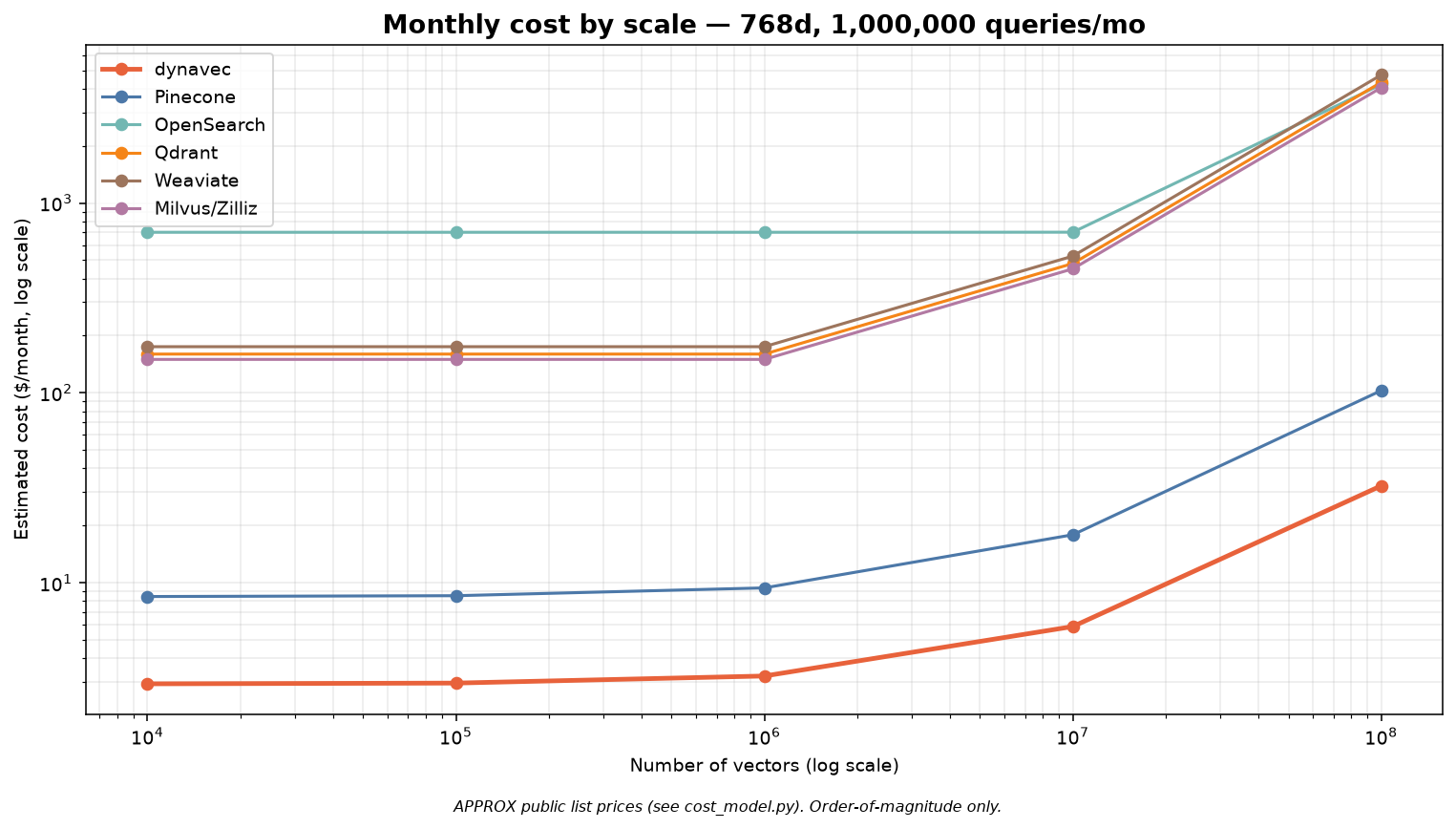
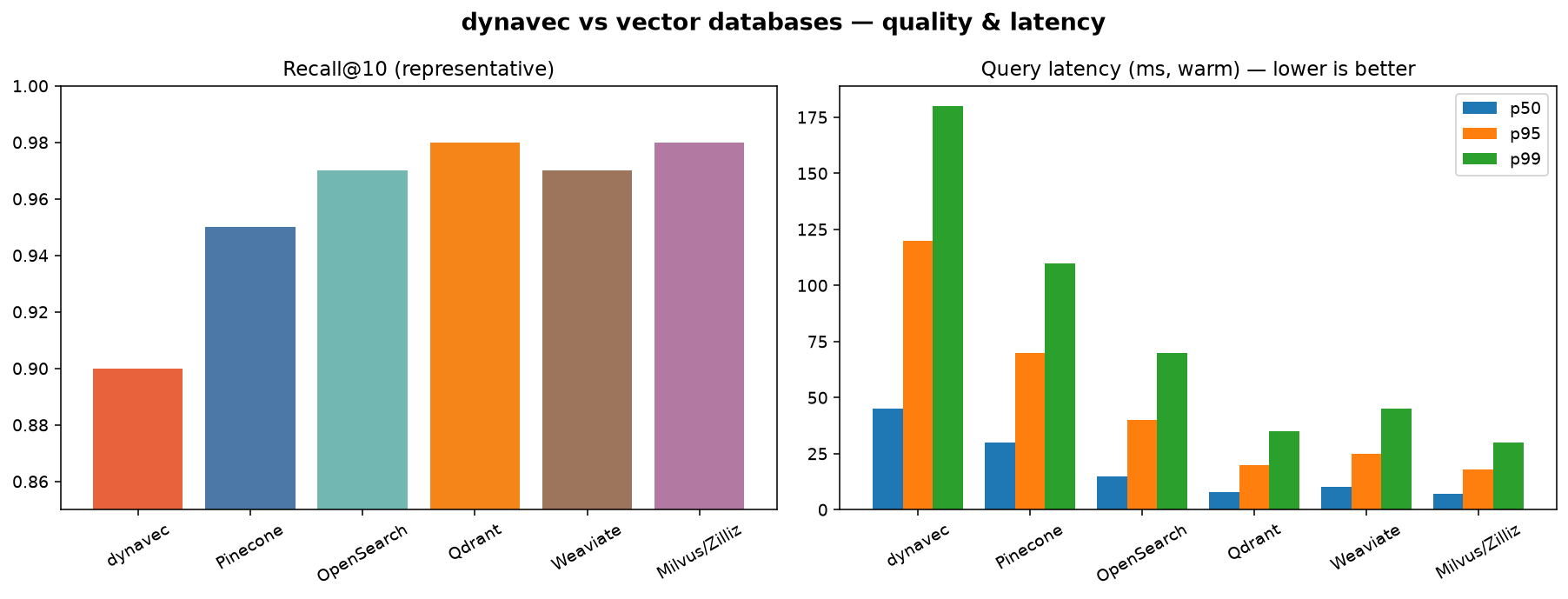
| Metric | dynavec | Pinecone | OpenSearch | Qdrant | Weaviate | Milvus/Zilliz |
|---|---|---|---|---|---|---|
| Recall@10 | 0.90 | 0.95 | 0.97 | 0.98 | 0.97 | 0.98 |
| Latency p50 (ms) | 45 | 30 | 15 | 8 | 10 | 7 |
| Latency p95 (ms) | 120 | 70 | 40 | 20 | 25 | 18 |
| Cost ($/mo) | $3 | $9 | $701 | $160 | $175 | $150 |
| Serverless (scale-to-zero) | Yes | Yes | No (OCU floor) | No (nodes) | No (nodes) | No (CU) |
| Data in your AWS account | Yes | No | Yes | Self-host only | Self-host only | Self-host only |
Honesty note: the cost row is computed by the repo's cost model from public list prices (order-of-magnitude; verify before quoting). Recall/latency are representative figures pending a live AWS run — regenerate real numbers with the commands below.
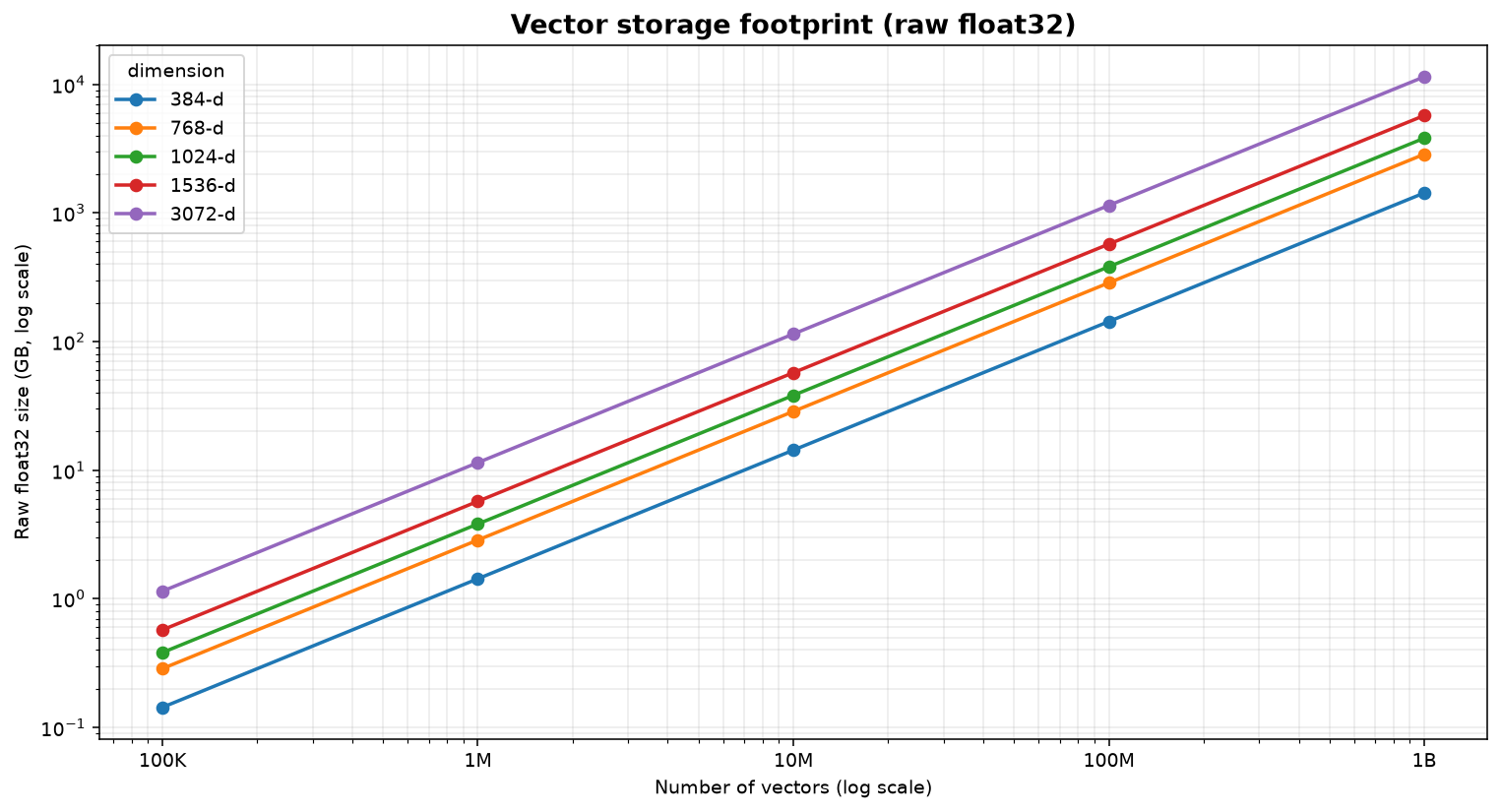
Cost across the common embedding dimensions (384 / 768 / 1024 / 1536 / 3072) and the full scale ladder. dynavec stays lowest at every point because its storage is priced like S3, not RAM — while cluster/OCU systems grow linearly with data held in memory.
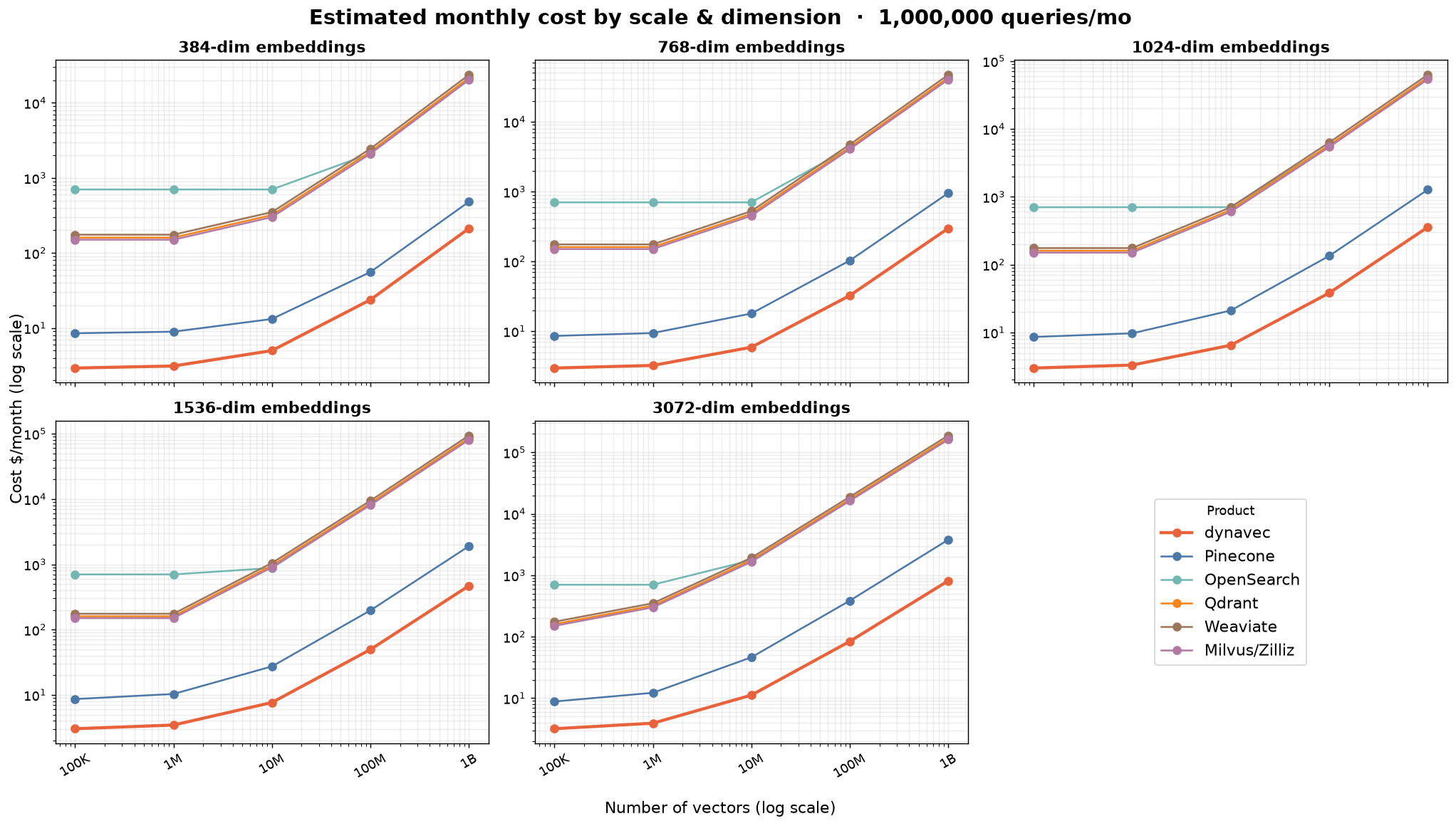
| Cost by dimension @ 100M vectors | Raw storage footprint | |
|---|---|---|
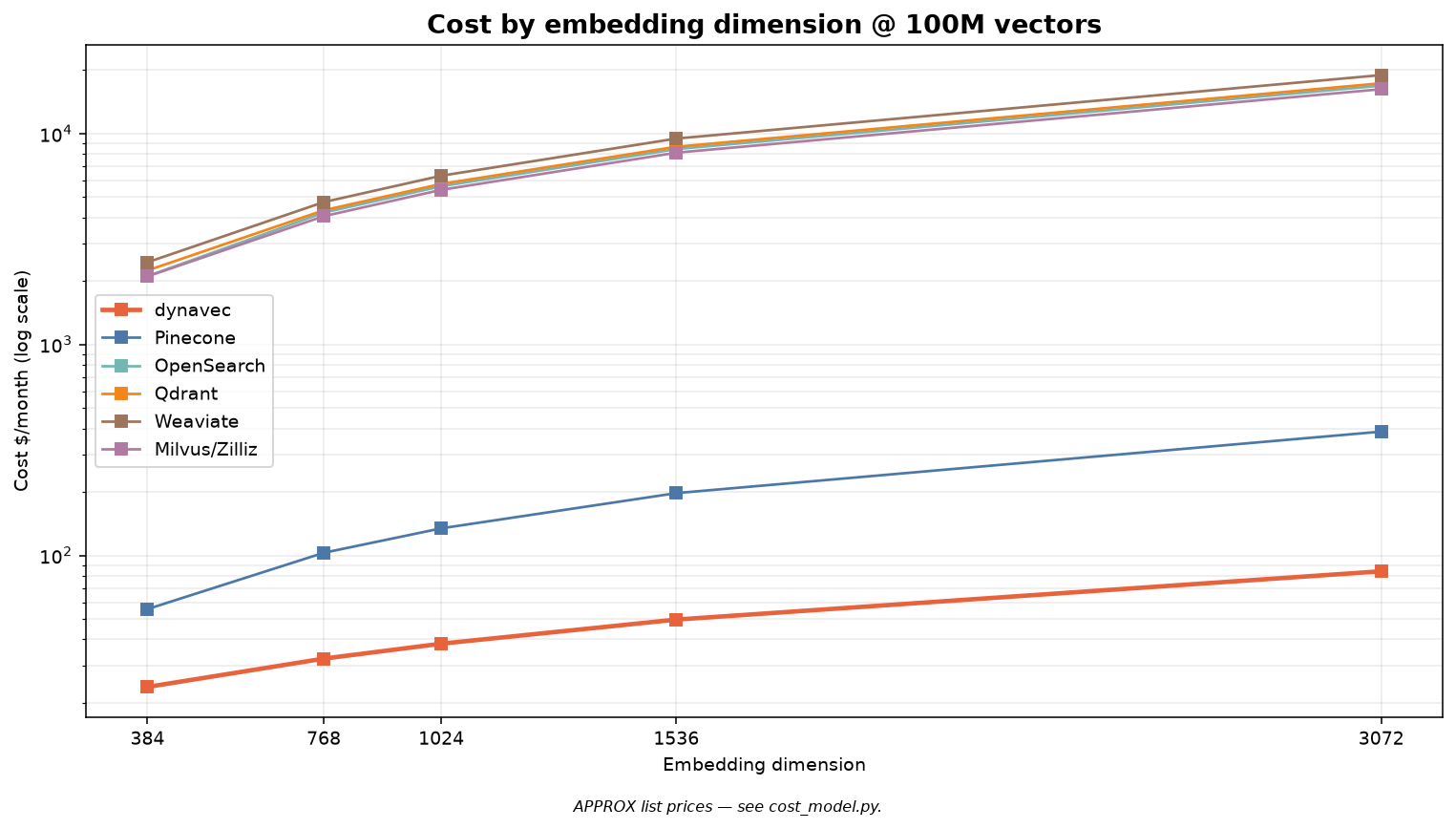 |
 |
1536-dim (e.g. OpenAI text-embedding-3-small) — $/month @ 1M queries/mo:
| Product | 100K | 1M | 10M | 100M | 1B |
|---|---|---|---|---|---|
| dynavec | $3 | $3 | $8 | $50 | $469 |
| Pinecone | $9 | $10 | $27 | $197 | $1,897 |
| OpenSearch | $701 | $701 | $877 | $8,423 | $83,708 |
| Qdrant | $160 | $160 | $960 | $8,640 | $85,920 |
| Weaviate | $175 | $175 | $1,050 | $9,450 | $93,975 |
| Milvus/Zilliz | $150 | $150 | $900 | $8,100 | $80,550 |
| raw float32 size | 1 GB | 6 GB | 57 GB | 572 GB | 5,722 GB |
Full tables for all five dimensions: scaling.md. At 1B × 1536-d that's ~5.7 TB of raw vectors — where dynavec's product quantization and the S3-priced tier matter most.
pip install "dynavec[benchmark]"          # or: uv add "dynavec[benchmark]"

# reproduce the charts + table above
python -m benchmarks.report --vectors 1_000_000 --dim 768 --qpm 1_000_000

# measure real recall + latency against your own AWS account
python -m benchmarks.run_benchmark --backend dynavec \
--bucket my-vectors --index bench --table dynavec_bench --n 100000 --dim 768A native, in-your-brand observability dashboard — a Langfuse-style view of real query telemetry (no simulated data). Attach a recorder and every search is captured with latency, cache outcome, result count, and score stats.
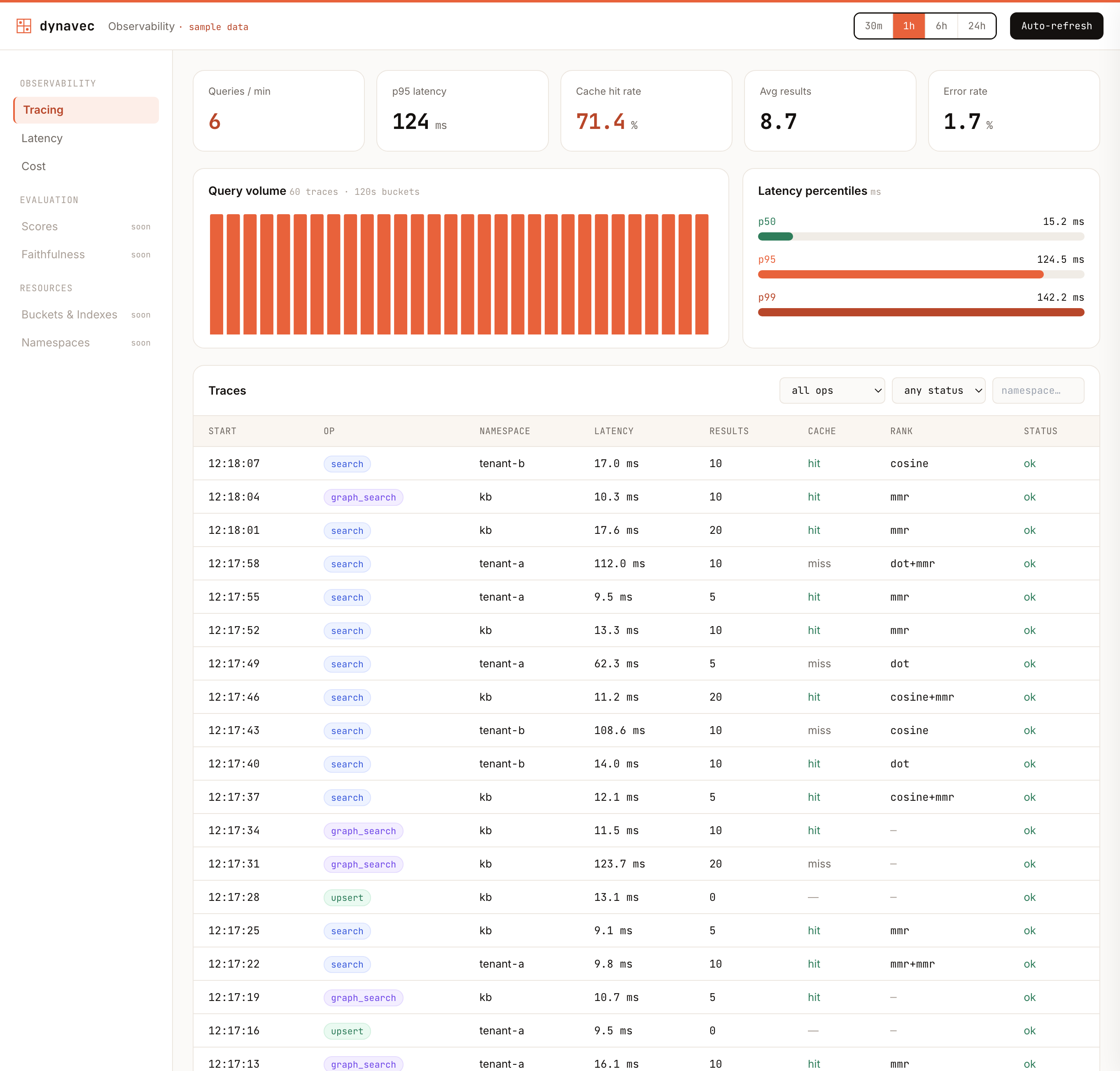
▶ Live interactive preview — in the landing-page theme.
The dashboard is a Next.js + TypeScript + Tailwind + Recharts app in dashboard/; the data comes from a tiny Python telemetry API. Two steps:
1. Expose real telemetry — attach a recorder to your client and serve the API:
from dynavec import Dynavec, DynavecConfig, SemanticCache
from dynavec.telemetry import TelemetryRecorder
from dynavec.dashboard import serve

rec = TelemetryRecorder()
db = Dynavec(cfg, embedder=emb, cache=SemanticCache(), telemetry=rec)
# ... your app runs searches; the recorder fills automatically ...
serve(rec, port=8779)          # JSON API at http://127.0.0.1:8779
2. Run the dashboard (points at that API; falls back to sample data if unset):
cd dashboard
npm install
NEXT_PUBLIC_DYNAVEC_API=http://127.0.0.1:8779 npm run dev   # http://localhost:3000
No AWS? python examples/dashboard_demo.py runs real searches against in-memory
stand-ins and serves the API on :8779 for the dashboard to read.
It shows a query-volume histogram, latency percentiles (p50/p95/p99), cache hit-rate, and a filterable traces table with per-trace drill-down. Contributors welcome: the Evaluation (recall@k, faithfulness), Resource (buckets/indexes/namespaces), and Cost panels are open under the dashboard epic (#122).
| Area | What you get | API |
|---|---|---|
| Distance metrics | Index on cosine/euclidean (S3 Vectors native); client-side rescore in cosine / dot / euclidean / manhattan or a weighted combination, with optional result-set normalization | search(..., rescore="dot", normalize_scores=True) |
| Concurrency | GIL-aware thread pool — real parallelism for I/O-bound AWS calls; parallel batched writes + search_many; tunable botocore connection pool (default 10, raise for high concurrency) |
DynavecConfig(max_workers=8, max_pool_connections=50), db.search_many([...]) |
| Streaming | Results yielded page-by-page as S3 Vectors paginates, so agents start consuming early | for hit in db.search_stream(q): ... |
| Namespace RAG | Per-tenant/collection handles; isolation + even partitioning | kb = db.namespace("kb"); kb.search(...) |
| Product quantization | Compress cached/hot-tier vectors up to 32× (ADC distance) | ProductQuantizer(m=96).fit(X) |
| Knowledge graph / ER | Entities + relations in DynamoDB linked to embeddings; traverse to scope/guide vector search (GraphRAG) | db.graph_add_edge(...), db.graph_search(q, seed_entities=[...]) |
| Query cache | DynamoDB-TTL exact cache, in-process semantic cache (serves near-duplicate queries), or Redis/ElastiCache | Dynavec(..., cache=SemanticCache()) |
| Ingestion / MCP | Pull + chunk + embed from any source; any MCP server's resources (Notion, Confluence, Drive, …) become a corpus | ingest(db, MCPResourceSource(session)) |
| Updates + Lambda | Update text/vector/metadata (merge or replace); transform pipeline incl. in-account AWS Lambda | db.update(id, ...), Dynavec(..., transform=LambdaTransform(...)) |
| IAM / credentials | Access keys, session tokens, named profiles, cross-account assume-role | Dynavec(..., credentials=AWSCredentials(...)) |
| Frameworks | LangChain + LlamaIndex vector stores; a framework-agnostic tool for LangGraph/CrewAI/Strands | dynavec.integrations.* |
| Benchmark report | Comparison table + recall/latency + cost-by-scale (log) charts | python -m benchmarks.report |
SemanticCache can be bounded by both entry count and approximate in-memory
size. Pass max_bytes to account for each cached float32 query vector and its
result object graph, and inspect size_bytes for the current accounted size:
cache = SemanticCache(max_size=2_048, max_bytes=64 * 1024 * 1024)Pre-populate the cache from a list of common queries at startup with warm_cache() —
it runs each query once (through search, so results land in the cache) and
returns the number of queries processed:
from dynavec import Dynavec, DynavecConfig, SemanticCache, warm_cache

db = Dynavec(DynavecConfig(...), embedder=..., cache=SemanticCache())
warm_cache(db, ["what is vector search", "how do i upsert documents"], top_k=10)
Pass the same filter / rescore / rerank options you use at runtime so the
warmed entries share cache keys with real queries.
Remove graph entities and relations with graph_delete_node() and
graph_delete_edge(). Both are idempotent and return the number of edges removed.
Deleting a node also strips every edge pointing at it (a namespace scan) but
leaves its linked documents and their embeddings untouched:
db.graph_delete_edge("acme", "competes_with", "globex", namespace="kb", bidirectional=True)
db.graph_delete_node("globex", namespace="kb")v0.5.0 (current) — adds office-document ingestion (Docx/Pptx/Xlsx), a Hugging Face Inference embedder, a DSPy retrieval integration, opt-in structured JSON logging (with secret redaction), ProductQuantizer save/load, dashboard dark mode, and vectorized MMR reranking — on top of the v0.4 in-memory hot tier and the v0.1 hybrid core.
See the full history in CHANGELOG.md, the browsable Release notes page, or the GitHub Releases tab.
Roadmap (v0.6): optional hnswlib/faiss hot-tier backend for very large hot sets, sparse/BM25 hybrid computed from DynamoDB, and OPQ (rotated product quantization).
dynavec publishes to PyPI; both pip and uv install from there (there is no separate "uv registry").
Automated (recommended) — a GitHub Release triggers .github/workflows/publish.yml, which builds and uploads via PyPI Trusted Publishing (OIDC) — no API token stored anywhere. One-time setup: on PyPI, add a pending publisher for project dynavec, repo codeforstartups/dynavec, workflow publish.yml, environment pypi. Then:
git tag v0.3.0 && git push origin v0.3.0 # then publish a GitHub Release for the tagManual — if you'd rather push from your machine with a token:
uv build                                      # -> dist/*.whl, dist/*.tar.gz
uv publish                                    # uses UV_PUBLISH_TOKEN / prompts
# or: python -m twine upload dist/*
Bump the version in both pyproject.toml and src/dynavec/__init__.py before releasing.
If you want to get more involved with dynavec, join our WhatsApp community. It's a friendly space to talk about vector search, RAG, AWS costs, production issues, and everything in between — ask questions, share what you're building, or help others out.
+----------------------------------------------------------------------------+
|     +----------------------------------------------------------------+     |
|     | Developers: Those who built with `dynavec`.                    |     |
|     | (You have `import dynavec` somewhere in your project)          |     |
|     |     +----------------------------------------------------+     |     |
|     |     | Contributors: Those who make `dynavec` better.     |     |     |
|     |     | (You make a PR to this repo)                       |     |     |
|     |     +----------------------------------------------------+     |     |
|     +----------------------------------------------------------------+     |
+----------------------------------------------------------------------------+
We welcome contributions from the community! Whether it's bug fixes, feature additions, or documentation improvements, your input is valuable. See CONTRIBUTING.md for the full guide, and browse good first issues to get started.
- Fork the repository
- Create your feature branch (
git checkout -b feature/AmazingFeature) - Commit your changes (
git commit -m 'Add some AmazingFeature') - Push to the branch (
git push origin feature/AmazingFeature) - Open a Pull Request
Apache-2.0