Extract main article, main image and meta data from URL.


deno add jsr:@extractus/article-extractorpnpm add jsr:@extractus/article-extractor
# or
npx jsr add @extractus/article-extractor
# or
bunx jsr add @extractus/article-extractorAlternatively, install from npm:
npm install @extractus/article-extractor
# or
bun add @extractus/article-extractorimport { extract } from "jsr:@extractus/article-extractor";
const data = await extract("https://example.com/article");
console.log(data);Load and extract article data from a URL or HTML string.
extract(input: string): Promise<ArticleData | null>
extract(input: string, parserOptions?: ParserOptions): Promise<ArticleData | null>
extract(input: string, parserOptions?: ParserOptions, fetcher?: Fetcher): Promise<ArticleData | null>
Example:
import { extract } from "jsr:@extractus/article-extractor";

try {
  const article = await extract("https://example.com/some-article");
  console.log(article);
} catch (err) {
  console.error(err);
}
The result can be null (when no article found) or an ArticleData object:
interface ArticleData {
  url?: string;           // best resolved URL
  links?: string[];       // alternative URLs (canonical, shortlink, amphtml)
  title?: string;         // article title
  description?: string;   // short description / excerpt
  image?: string;         // main image URL
  favicon?: string;       // site favicon URL
  author?: string;        // author name
  content?: string;       // extracted article HTML
  source?: string;        // original publisher domain
  published?: string;     // publication date string
  ttr?: number;           // estimated time to read (seconds), 0 = unknown
  type?: string;          // page type (e.g. "article")
}URL string or raw HTML content.
| Property | Type | Default | Description |
|---|---|---|---|
wordsPerMinute |
number |
300 |
Words per minute for time-to-read estimation |
descriptionTruncateLen |
number |
210 |
Max characters for generated description |
descriptionLengthThreshold |
number |
180 |
Min characters to keep meta description |
contentLengthThreshold |
number |
200 |
Min characters for article content |
allowedTags |
string[] |
(semantic/content tags) | HTML tags to keep in output |
allowedAttributes |
Record<string, string[]> |
(src, href, alt, etc.) | Per-tag attributes to keep |
allowedIframeDomains |
string[] |
(youtube, vimeo, etc.) | Allowed domains for iframe src |
const article = await extract(url, {
  descriptionLengthThreshold: 120,
  contentLengthThreshold: 500,
});A custom fetch function with the signature (url: string) => Promise<Response>.
Use this to customize HTTP behavior: proxy, headers, TLS, authentication, timeouts, etc.
Defaults to globalThis.fetch.
Deno (with proxy):
import { extract } from "@extractus/article-extractor";

const client = Deno.createHttpClient({
  proxy: { url: "http://proxy.example.com:8080" },
});
const myFetcher = (url: string) => fetch(url, { client });

const result = await extract("https://example.com/some-article", {}, myFetcher);
Node.js (with proxy via undici):
import { extract } from "@extractus/article-extractor";
import { fetch, ProxyAgent } from "undici";

const dispatcher = new ProxyAgent("http://proxy.example.com:8080");
const myFetcher = (url: string) => fetch(url, { dispatcher });

const result = await extract("https://example.com/some-article", {}, myFetcher);
Bun (with proxy):
import { extract } from "@extractus/article-extractor";

const myFetcher = (url: string) =>
  fetch(url, {
    proxy: "http://proxy.example.com:8080",
  });

const result = await extract("https://example.com/some-article", {}, myFetcher);
Custom headers:
const myFetcher = (url: string) =>
  fetch(url, {
    headers: {
      "user-agent": "MyBot/1.0",
      authorization: "Bearer token123",
    },
  });

const result = await extract("https://example.com/some-article", {}, myFetcher);
Request timeout:
const myFetcher = (url: string) =>
  fetch(url, {
    signal: AbortSignal.timeout(5000),
  });

const result = await extract("https://example.com/some-article", {}, myFetcher);Extract article data from an HTML string directly.
extractFromHtml(html: string): Promise<ArticleData | null>
extractFromHtml(html: string, url?: string): Promise<ArticleData | null>
extractFromHtml(html: string, url?: string, parserOptions?: ParserOptions): Promise<ArticleData | null>
Example:
import { extractFromHtml } from "jsr:@extractus/article-extractor";

const res = await fetch(url);
const html = await res.text();

const article = await extractFromHtml(html, url);HTML string containing the article.
Source URL for resolving relative links.
See parserOptions above.
Sometimes the default extraction algorithm may not work well. Transformations let you add pre/post processing per-site.
addTransformations(transformation: Transformation | Transformation[]): numberremoveTransformations(patterns?: RegExp[]): number
interface Transformation {
  patterns: RegExp[];                        // URL patterns to match
  pre?: (document: Document) => Document;    // pre-process raw HTML
  post?: (document: Document) => Document;   // post-process extracted article
}
For URLs matching
patterns, runpreon raw HTML, extract article, then runposton the result.
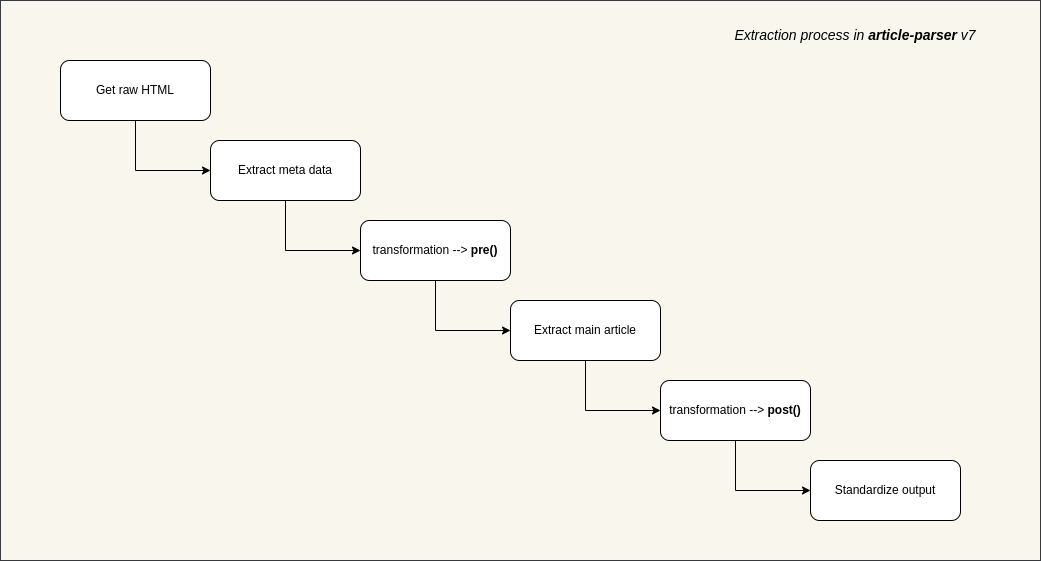
Example:
import { addTransformations } from "jsr:@extractus/article-extractor";

addTransformations({
  patterns: [/([\w]+.)?domain\.tld\/*/],
  pre: (document) => {
    document.querySelectorAll(".advertise-area").forEach((el) => {
      el.parentNode?.removeChild(el);
    });
    return document;
  },
  post: (document) => {
    document.querySelectorAll("h4").forEach((el) => {
      const h2 = document.createElement("h2");
      h2.innerHTML = el.innerHTML;
      el.parentNode?.replaceChild(h2, el);
    });
    return document;
  },
});
To write better transformations, refer to linkedom and the Document API.
Add a single or multiple transformations. Transformations without patterns are ignored.
import { addTransformations } from "jsr:@extractus/article-extractor";

addTransformations([
  {
    patterns: [/([\w]+.)?abc\.tld\/*/],
    pre: (doc) => { /* ... */ return doc; },
    post: (doc) => { /* ... */ return doc; },
  },
  {
    patterns: [/([\w]+.)?xyz\.tld\/*/],
    post: (doc) => { /* ... */ return doc; },
  },
]);Remove transformations matching the given patterns. Call without arguments to remove all.
import { removeTransformations } from "jsr:@extractus/article-extractor";

removeTransformations([
  /([\w]+.)?abc\.tld\/*/,
  /([\w]+.)?xyz\.tld\/*/,
]);When multiple transformations match, they all execute in order.
Given two transformations matching goo.gl:
pre_one -> pre_three -> extraction -> post_two -> post_four
Extracted HTML is sanitized using a built-in DOM tree walker. Disallowed tags are removed (not escaped), and disallowed attributes are stripped. Configure via parserOptions:
import { extract } from "jsr:@extractus/article-extractor";

// allow class attributes on <code> and <div>
const article = await extract(url, {
  allowedAttributes: {
    a: ["href", "target", "title"],
    img: ["src", "srcset", "alt", "title"],
    code: ["class"],
    div: ["class"],
  },
});
To see the full defaults, refer to src/config.ts.
git clone https://github.com/extractus/article-extractor.git
cd article-extractor

# run tests
deno test --allow-all

# lint
deno lint

# build npm package
deno run -A ./scripts/build_npm.tsThe MIT License (MIT)
This project is maintained in my spare time. If you find it helpful, there are a few simple ways to support its continued development:
- ⭐ Star this repository to help more people discover it.
- ☕ Buy me a coffee: https://paypal.me/ndaidong
- 🚀 Subscribe to the Article Extractor service on RapidAPI.
Every bit of support helps keep this project actively maintained. Thank you! ❤️