



Bring Vercel Web Analytics and Plausible reports into the Umbraco backoffice. Editors can understand site-wide traffic and the performance of the page they are working on without leaving Umbraco.
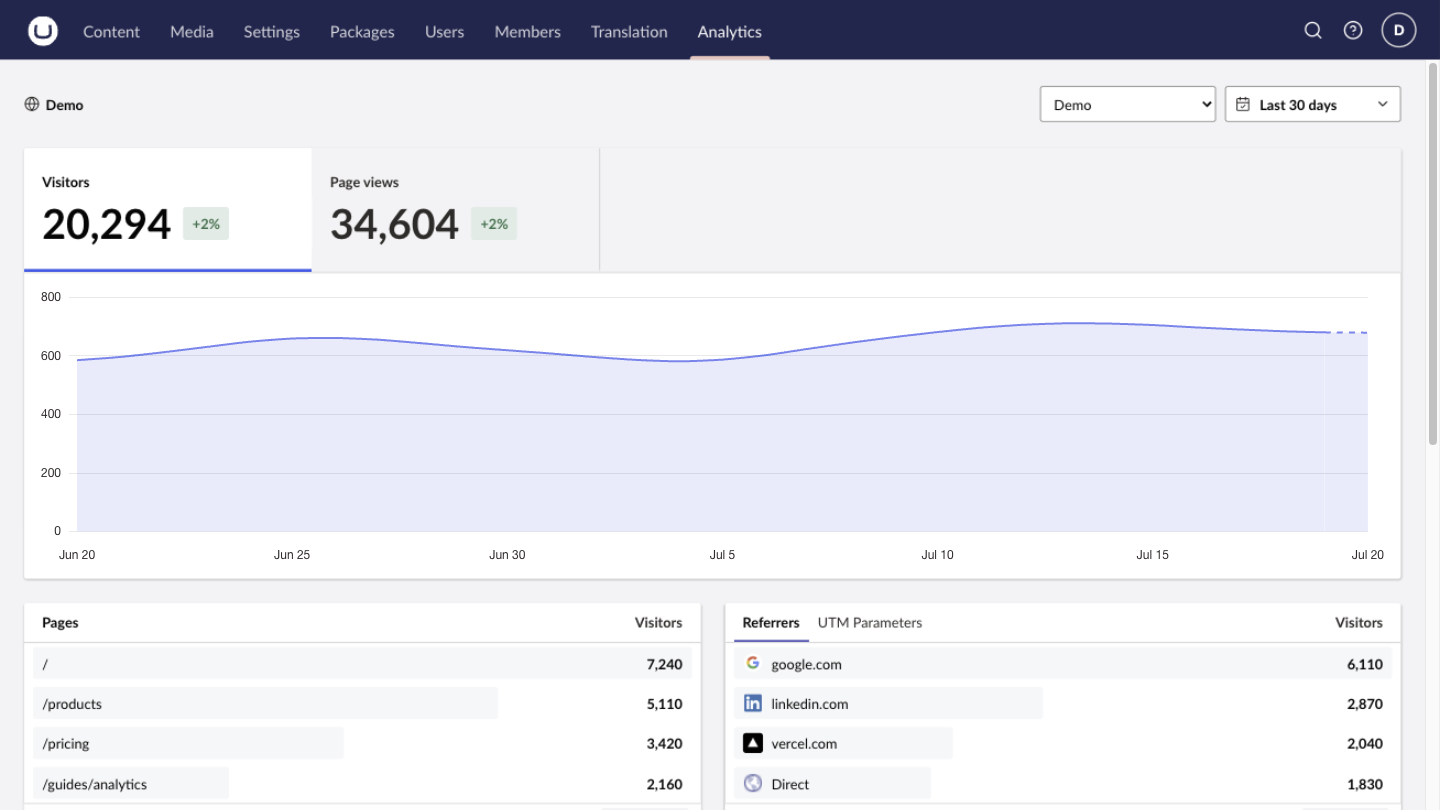
Web Analytics reads analytics already collected by the configured provider. It does not install, replace, or configure tracking on your public website.
Web Analytics supports Umbraco CMS 17.1 through 18.x. Add it to the Umbraco web project:
dotnet add package TheBuilder.WebAnalyticsYour public site must already collect analytics with Vercel or Plausible; this package reads that data and does not add tracking of its own.
The package registers its services and backoffice extensions automatically. Then:
- Configure a provider credential in server-side secret configuration (see below).
- Restart the Umbraco application so it reads the credential.
- As an administrator, open Settings → Web Analytics, add a connection, and select Test connection.
- Open the Analytics section to verify that reports load.
To let non-admin editors see reporting, grant the Analytics section to their user group; the automatic administrator grant runs only once.
| Provider | Identifier | Credential |
|---|---|---|
| Vercel Web Analytics | Project ID (prj_...) and optional team |
Scoped access token |
| Plausible | Site ID, normally the registered domain | Stats API key |
Plausible Cloud's Stats API requires a Business plan. Self-hosted Plausible is supported when its instance exposes the v2 Stats API query endpoint.
Provider credentials are always read from server-side configuration and are never stored in Umbraco or exposed to the browser. Keep them out of appsettings.json and source control. Use environment variables, .NET user secrets, or your hosting platform's secret store. Restart every application instance after adding or rotating a credential.
The configuration keys use the standard .NET double-underscore (__) delimiter for environment variables, or : for user secrets and JSON.
- Create a Vercel access token scoped to the account or team that owns the project.
- Provide it as
WebAnalytics__Providers__Vercel__AccessToken. - Note the project ID (
prj_...), and the team ID (team_...) or slug for a team-owned project, to enter in Settings.
dotnet user-secrets set "WebAnalytics:Providers:Vercel:AccessToken" "your_token" --project path/to/Your.Umbraco.Web.csproj- Create a Plausible Stats API key for the site you want to connect.
- Provide it as
WebAnalytics__Providers__Plausible__AccessToken. - Note the Site ID (normally the registered domain) to enter in Settings.
- For a self-hosted instance, set
WebAnalytics__Providers__Plausible__BaseUrlto its public base URL (it must expose/api/v2/query). Cloud users keep the defaulthttps://plausible.io/.
dotnet user-secrets set "WebAnalytics:Providers:Plausible:AccessToken" "your_stats_api_key" --project path/to/Your.Umbraco.Web.csproj
dotnet user-secrets set "WebAnalytics:Providers:Plausible:BaseUrl" "https://analytics.example.com/" --project path/to/Your.Umbraco.Web.csprojWhen one connection needs a different credential from the shared provider token, set a connection-specific override keyed by the connection GUID. The Settings screen shows the exact key. An override takes precedence over the shared provider credential.
WebAnalytics__ConnectionAccessTokens__{connection-guid}
The Settings screen (Settings → Web Analytics) is the normal way to manage connections. Configuration precedence works as follows:
- At startup the package reads the
WebAnalyticssection from server configuration. - Until an administrator first saves Settings, those non-secret values are the active configuration.
- After the first save, non-secret connection settings are stored in Umbraco and become the source of truth.
- Provider credentials always remain in server-side configuration, regardless of saved settings.
Each application instance keeps its own in-memory report cache, so restart every instance after changing saved settings or credentials.
Besides the provider credentials above, these tunables live under the WebAnalytics section:
| Key | Default | Description |
|---|---|---|
Enabled |
true |
Enables the Analytics section and configured document workspace views. |
DefaultRangeDays |
30 |
Initial reporting range, in days. Valid values are 1 to 730. |
CacheDuration |
00:05:00 |
Per-instance in-memory cache duration. Valid from zero to one hour. |
Connections |
[] |
Provider connection definitions. The first becomes the initial default. |
EnableMockConnections |
false |
Development-only deterministic connection presets. Never enable in production. |
Connections are normally created through the Settings screen, but they can also be bootstrapped from configuration for deployment automation. The configuration reference documents every connection key and the full precedence rules.
The full documentation site covers everything above in more depth, plus the reporting UI and per-provider capabilities:
- Quickstart: install, connect a provider, and verify the dashboard.
- Understanding your reports: what each metric, breakdown, and control means.
- Document analytics: show page-level reports on mapped documents.
- Configuration reference and troubleshooting.
Contributions are welcome. See CONTRIBUTING.md for the repository layout, local development setup (building the backoffice client, running the sample site, and running the tests), and how to submit a pull request. NuGet publishing guidance is in docs/releasing.md, and published release notes are in the documentation changelog.